
Serial Device Server Installation Best Practices for Industrial Environments
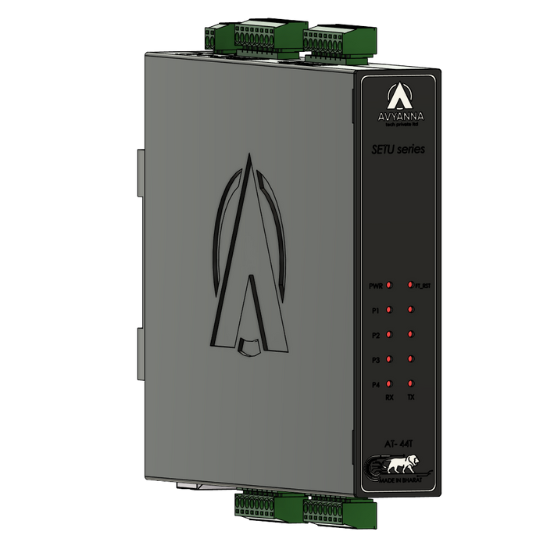
Serial Device Server Installation Guide for Industries 2026
In modern industrial settings, connecting legacy serial devices to Ethernet networks is critical for automation, monitoring, and control. Avyanna Tech’s SETU Series Serial Device Servers, including the AT-41T, AT-42T, and AT-44T models, offer seamless connectivity between RS-232/422/485 serial devices and Ethernet networks. To ensure optimal performance, it’s essential to follow best practices during installation and configuration.
Understanding Serial Device Servers in Industrial Applications
A serial device server allows traditional serial equipment to communicate over TCP/IP networks without protocol conversion. This enables:
- Remote access to serial devices
- Centralized monitoring and control
- Integration with modern industrial automation systems
Avyanna Tech’s SETU series provides robust solutions designed for industrial-grade reliability, supporting multiple operation modes like VCOM, TCP Server/Client, UDP Server/Client, and Telnet. The devices support up to 10 simultaneous connections per serial port in TCP Server mode, making them ideal for factory floors, manufacturing lines, and industrial monitoring.
Pre-Installation Checklist
Before installing a serial device server, ensure the following:
- Correct Model Selection
- AT-41T – 1-port RS-232/422/485
- AT-42T – 2-port RS-232/422/485
- AT-44T – 4-port RS-232/422/485
Choose based on the number of serial devices and network requirements.
- Power Supply Verification
- Ensure stable 9–36 V DC input
- Check power connector compatibility (terminal block type)
- Environmental Considerations
- Operating temperature: 0–60°C
- Humidity: 20–95% RH
- IP54-rated enclosure ensures dust and splash resistance
- Network Infrastructure
- 10/100Base-T Ethernet network ready
- Confirm LAN cabling and switch availability
Installation Best Practices
1. Mounting & Physical Placement
- Use DIN-rail mounting for secure installation
- Avoid areas with high vibration, heat, or moisture
- Maintain adequate space for cabling and airflow
2. Cabling & Port Configuration
- Use DB9 connectors or terminal blocks for serial connections
- Select the correct serial mode (RS-232/422/485) via software configuration
- Terminating resistors and pull high/low resistors are built-in, but verify RS-485 line integrity for long cables
3. Ethernet Setup
- Connect the 10/100 Mbps Ethernet port to your network
- Check LED indicators: Link/Active, Speed, Tx/Rx for troubleshooting
- Assign static IP or enable DHCP based on network policy
4. Software Configuration
- Use Windows Utility or Web-based tools for configuration
- Configure operation mode: VCOM, TCP Server/Client, UDP Server/Client
- Verify baud rate, data bits, stop bits, and parity match the connected serial device
5. Safety & Protection
- Devices feature 8 kV ESD protection and reverse voltage protection
- Ensure proper grounding for optimal safety
- Keep serial lines isolated using the galvanic/optical isolation provided in AT-41T/42T/44T models
Testing & Commissioning
- Check Connections: Verify all serial and Ethernet connections are secure
- Ping Test: Confirm device responds on the network
- Serial Communication Test: Ensure data is transmitted correctly between the server and connected devices
- Monitor LEDs: Power, Tx, Rx, and LAN indicators should function normally
Maintenance Tips
- Clean the enclosure and connectors periodically
- Monitor device performance using the built-in software utility
- Update firmware as recommended by Avyanna Tech for improved performance and security
- Check for proper ventilation and environmental compliance
Why Choose Avyanna Tech’s SETU Series?
The AT-41T, AT-42T, and AT-44T serial device servers are built for industrial-grade reliability, offering:
- Multiple operation modes for flexible deployment
- Up to 10 simultaneous connections per serial port
- Robust power and signal protection
- Easy-to-use configuration tools for quick commissioning
Following these installation best practices ensures long-lasting performance, seamless serial-to-Ethernet communication, and reduced downtime in industrial environments.
Conclusion
Installing a serial device server in industrial settings is not just about connecting devices; it’s about ensuring reliable communication, safety, and long-term performance. By following the best practices outlined above, industrial operators can fully leverage Avyanna Tech’s SETU series to modernize legacy systems, enable remote monitoring, and streamline automation processes.
For more details and technical datasheets, Visit our official page or Contact us.
[email protected]