
How Industrial Keyboards Improve Productivity in Control Rooms
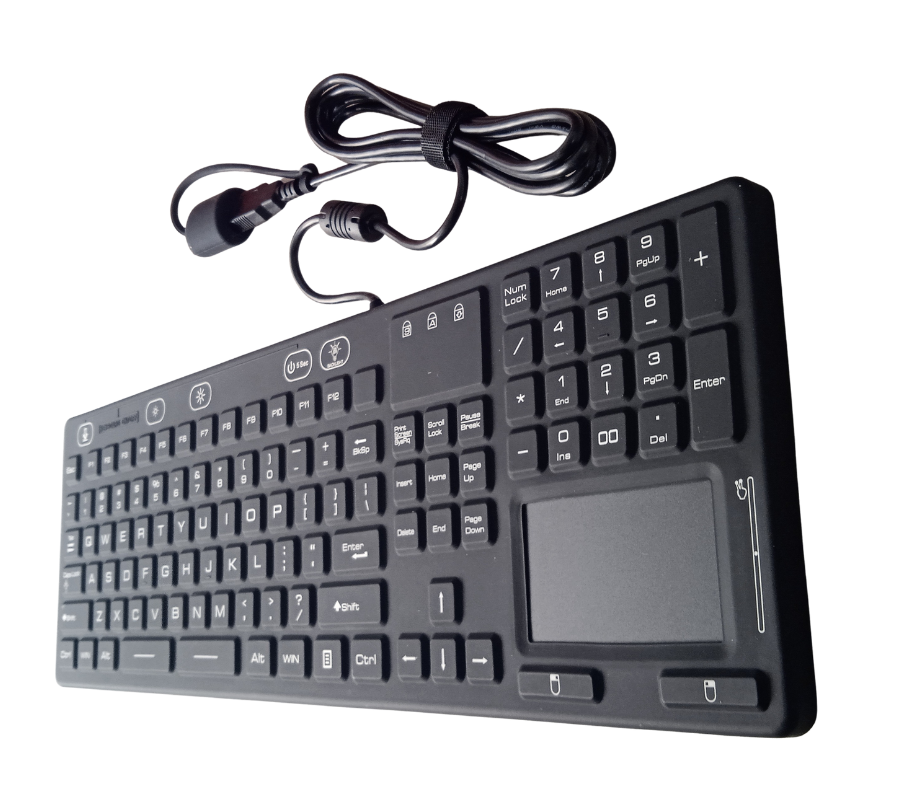
Industrial Keyboard: Boost Control Room Productivity
An industrial keyboard is built to survive exactly the kind of environment a standard office keyboard can’t: dust, spilled liquids, constant handling, and round-the-clock use in control rooms, SCADA centers, and process plants. But beyond just surviving, the right industrial keyboard actively improves how operators work – reducing input errors, cutting downtime from hardware failure, and speeding up navigation between control screens.
In control rooms specifically, where operators may monitor dozens of screens and systems during a single shift, keyboard reliability and ergonomics directly affect operational efficiency. A jammed key, a liquid-damaged unit, or a keyboard that requires a separate mouse to navigate all cost time – and in a control room, lost time can mean delayed responses to alarms or process changes.
This article looks at how an industrial keyboard – including options like an industrial keyboard with trackpad – improves productivity, reduces downtime, and supports better operator performance in demanding control room environments.
What Makes an Industrial Keyboard Different from a Standard Keyboard?
An industrial keyboard is purpose-built for continuous use in harsh or demanding environments, with construction and features that address the specific failure points common in control rooms and industrial settings:
- Sealed, washable membranes rated IP65-IP68 to resist dust, liquid spills, and cleaning chemicals
- Reinforced keys and housings designed for high-frequency use over years, not months
- Backlit or illuminated keys for low-light control rooms or night-shift visibility
- Antimicrobial coatings, common in pharmaceutical, food processing, and healthcare control environments
- Integrated pointing devices such as trackpads or trackballs, reducing the need for a separate mouse
- Rugged cabling and connectors, often with locking USB or PS/2 connections to prevent accidental disconnection
These features aren’t cosmetic – each one addresses a specific way standard keyboards fail in industrial and control room settings.
Why Control Rooms Need Purpose-Built Keyboard Hardware
Control rooms operate differently from typical office environments, and the hardware inside them needs to reflect that:
- 24/7 operation – control rooms rarely go idle, meaning keyboards endure far more cumulative use than office equipment, accelerating wear on non-industrial keys and switches.
- Frequent cleaning and sanitation – especially in pharmaceutical, food and beverage, or healthcare-adjacent facilities, keyboards must tolerate regular disinfecting without damage.
- Limited desk space – many control room workstations are tightly packed with multiple monitors, radios, and phones, making a separate mouse impractical. An industrial keyboard with trackpad solves this by combining full navigation into one compact unit.
- High-stakes accuracy – a missed or double-registered keystroke while adjusting setpoints or acknowledging alarms can have real operational consequences, making reliable key response critical.
- Environmental exposure – dust, humidity, and temperature swings common in industrial facilities can degrade standard consumer keyboards within months.
How an Industrial Keyboard Improves Productivity
- Fewer Hardware Failures Mean Less Downtime: Standard keyboards in industrial environments often fail within months due to dust ingress, liquid damage, or mechanical wear – each failure requiring replacement, reconfiguration, and lost operator time. A ruggedized industrial keyboard, rated for continuous industrial use, dramatically reduces this failure rate, keeping workstations operational without interruption.
- Faster Navigation with Integrated Trackpads: An industrial keyboard with trackpad allows operators to move between screens, acknowledge alarms, and adjust controls without switching between a keyboard and a separate mouse. This is especially valuable in multi-monitor SCADA and HMI setups, where constant hand movement between input devices slows down response time during critical events.
- Reduced Input Errors: Sealed, tactile key switches on industrial keyboards are engineered for consistent actuation, reducing missed keystrokes or accidental double-entries – a meaningful factor when operators are inputting setpoints, recipe parameters, or safety-critical commands.
- Improved Operator Comfort and Focus: Backlit keys, ergonomic layouts, and integrated pointing devices reduce physical strain during long shifts, allowing operators to maintain focus on monitoring rather than fighting with unreliable or awkward input hardware.
- Simplified Workstation Design: By combining keyboard and trackpad into a single rugged unit, control rooms can reduce desk clutter, simplify cabling, and standardize workstation layouts across multiple operator stations – useful for facilities running consistent SCADA or DCS configurations across shifts.
Industrial Keyboard with Trackpad: A Closer Look
An industrial keyboard with trackpad integrates a sealed, ruggedized pointing surface directly into the keyboard housing, eliminating the need for a separate mouse. This is particularly useful in:
- Space-constrained control room desks with multiple monitors and equipment
- Washdown or cleanroom environments, where a separate mouse would be an additional point of contamination risk or failure
- Mobile or panel-mounted workstations, where a loose mouse isn’t practical
- Facilities standardizing on single-unit input devices to simplify maintenance and replacement parts inventory
Most industrial keyboards with trackpad maintain the same IP-rated sealing as the keyboard itself, ensuring the pointing device doesn’t become the weak point in an otherwise rugged setup.
Industrial Keyboard vs. Standard Office Keyboard
| Factor | Industrial Keyboard | Standard Office Keyboard |
| Environmental sealing | IP65-IP68, dust/liquid resistant | None or minimal splash resistance |
| Expected lifespan (continuous use) | Several years | Months to 1-2 years |
| Cleaning tolerance | Withstands disinfectants and washdown | Damaged by liquids and harsh cleaners |
| Integrated pointing device | Often available (trackpad/trackball) | Requires separate mouse |
| Key switch durability | Rated for millions of actuations | Lower-rated consumer switches |
| Mounting options | Panel-mount, rack-mount, VESA | Desktop only |
| Lighting | Backlit options for low-light rooms | Rarely available |
How to Choose the Right Industrial Keyboard for Your Control Room
- IP rating: Match the sealing rating (IP65, IP66, IP68) to your facility’s actual exposure to dust, liquids, and cleaning chemicals.
- Integrated trackpad or trackball: Choose an industrial keyboard with trackpad if desk space is limited or a separate mouse isn’t practical.
- Mounting style: Confirm compatibility with your workstation setup – desktop, panel-mount, rack-mount, or VESA arm mounting.
- Backlighting: Prioritize illuminated keys for control rooms with dimmed lighting or 24/7 shift operation.
- Connector type: Locking USB connectors reduce the risk of accidental disconnection in busy control room environments.
- Antimicrobial surface treatment: Important for pharmaceutical, food processing, or healthcare-adjacent facilities requiring regular sanitation.
- Certifications: Confirm CE, FCC, and any hazardous-area certifications relevant to your industry.
Frequently Asked Questions
What is an industrial keyboard used for?
An industrial keyboard is used in control rooms, factories, and other demanding environments where standard keyboards fail due to dust, liquid exposure, or heavy continuous use. It provides reliable, sealed, and durable text and command input for SCADA, HMI, and process control systems.
What is an industrial keyboard with a trackpad?
An industrial keyboard with trackpad is a ruggedized keyboard that includes a built-in, sealed pointing surface, allowing operators to navigate screens and control systems without a separate mouse – useful in space-constrained or washdown control room environments.
How does an industrial keyboard improve control room productivity?
An industrial keyboard reduces hardware failures, minimizes input errors from unreliable key switches, and – when paired with an integrated trackpad – speeds up navigation between screens, all of which reduce downtime and improve operator response time.
What IP rating should a control room keyboard have?
Most control rooms benefit from at least an IP65 rating for dust and splash resistance. Facilities requiring frequent washdown or disinfection, such as pharmaceutical or food processing control rooms, often require IP66 or IP68-rated keyboards.
Can an industrial keyboard be mounted into a control panel?
Yes. Many industrial keyboards are designed for panel-mount, rack-mount, or VESA-arm installation, allowing them to be integrated directly into control room furniture or equipment enclosures rather than sitting loose on a desk.
Equip Your Control Room for Reliable, Efficient Operation
Control room productivity depends on hardware that keeps up with 24/7 demands – and an industrial keyboard is one of the most direct ways to reduce downtime, input errors, and operator fatigue. Whether you need a straightforward sealed keyboard or a space-saving industrial keyboard with trackpad, choosing the right rugged input device pays off in fewer replacements and smoother day-to-day operation.
At Avyanna Tech, we help control rooms and industrial facilities select the right rugged keyboard and trackpad solutions for their environment. Contact us to explore our IP68-rated industrial keyboard with trackpad options and give your operators hardware built to keep pace with the job.

[email protected]