
Why Fanless Box PCs Deliver Better Reliability in Dusty Industrial Environments
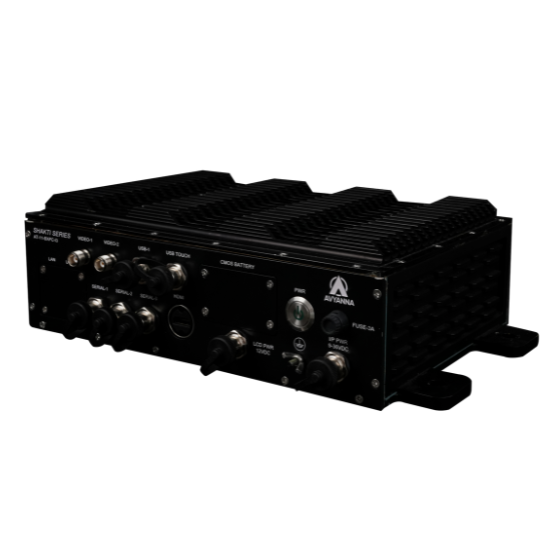
Box PC Reliability: Fanless Design Beats Dust
Dust is one of the most underestimated causes of computer failure on a factory floor. A box PC sitting near a CNC machine, packaging line, or material handling area is constantly exposed to airborne particulates – and in a standard, fan-cooled computer, that dust doesn’t just sit on the outside. It gets pulled directly into the case, coating circuit boards, clogging heat sinks, and eventually causing overheating, component failure, or complete system shutdown.
This is exactly the problem a fanless box PC is designed to solve. By eliminating the cooling fan entirely and sealing the enclosure, a rugged box PC removes the mechanism that pulls dust inside in the first place – addressing the root cause of failure rather than just building a computer that’s “tougher” in a general sense.
This article looks specifically at why dust causes standard computers to fail, how fanless and sealed box PC designs solve the problem, and what to look for when selecting an industrial fanless PC box for a dusty facility.
How Dust Actually Destroys Standard Computers
To understand why fanless design matters so much, it helps to walk through exactly how dust causes failure in a conventional, fan-cooled computer:
- Fans actively pull dust inside. Cooling fans work by drawing air through the case to move heat away from components – but that same airflow pulls in whatever particulates are floating in the surrounding environment.
- Dust accumulates on heat sinks and components. Over weeks and months, dust builds up on CPU heat sinks, circuit boards, and fan blades, forming an insulating layer that traps heat instead of releasing it.
- Reduced airflow raises internal temperatures. As dust accumulates, airflow through the case decreases, causing internal temperatures to climb even as the fan continues running.
- Overheating triggers throttling or shutdown. Once internal components exceed safe operating temperatures, the system throttles performance or shuts down entirely to prevent damage – often at the worst possible moment for a production-critical system.
- Conductive dust can cause short circuits. In environments with metallic dust (common in machining or metalworking), accumulated particulate can create unintended electrical paths on circuit boards, leading to component damage or complete failure.
- Fan bearings wear out faster. Dust-laden fans experience accelerated bearing wear, eventually causing the fan itself to fail – removing cooling capacity entirely and accelerating the entire failure cycle.
How a Fanless Box PC Solves the Dust Problem
A fanless box PC addresses dust-related failure at its source, rather than trying to manage it after the fact:
No Fan Means No Airflow Pulling Dust Inside
Without a cooling fan, there’s no mechanism actively drawing dust and particulates into the enclosure. Heat is instead transferred passively through the metal chassis itself, which acts as one large heat sink – a fundamentally different cooling approach that doesn’t depend on moving air through the case.
Sealed Enclosures Keep Contaminants Out Entirely
Most fanless box PCs are housed in sealed aluminum or steel enclosures rated IP40 to IP65 or higher. This sealing prevents dust, debris, and in higher-rated models, moisture, from reaching internal components at all – rather than just slowing down how quickly it accumulates.
No Moving Parts Means No Bearing Wear
Eliminating the fan also eliminates the mechanical wear that eventually causes fans to fail. A fanless box PC’s cooling performance doesn’t degrade over time the way a dust-clogged, bearing-worn fan does, meaning thermal performance stays consistent for the life of the unit.
Passive Cooling Scales Predictably with Ambient Temperature
Because passive cooling relies on the chassis design and ambient airflow rather than active fan speed, a properly designed rugged box PC maintains predictable thermal performance across its rated operating range – often -20°C to 60°C or wider – without the variability introduced by dust-affected fan performance.
Fanless Box PC vs. Fan-Cooled PC in Dusty Environments
| Factor | Fanless Box PC | Fan-Cooled PC |
| Dust ingress | Minimal to none (sealed design) | Actively pulled in by fan airflow |
| Cooling method | Passive heat sink through chassis | Active airflow, fan-dependent |
| Moving parts | None | Fan (subject to bearing wear) |
| Maintenance needs | Minimal, no fan cleaning required | Periodic fan/vent cleaning needed |
| Failure mode in dusty conditions | Rare, no airflow-dependent cooling | Overheating, throttling, or shutdown |
| Long-term thermal consistency | Stable over product lifespan | Degrades as dust accumulates |
| Typical enclosure rating | IP40-IP65+ | Often unsealed or minimally rated |
Signs Your Facility Needs a Fanless Box PC Instead of a Standard PC
- Visible dust buildup on existing computer vents, fans, or nearby equipment surfaces
- Frequent unexplained shutdowns or performance slowdowns on computers running near production machinery
- Metalworking, woodworking, or cement/aggregate processing environments where fine particulate is a constant presence
- High-traffic industrial areas where computers are difficult to physically clean on a regular schedule
- Mission-critical applications – SCADA, machine vision, safety monitoring – where unplanned downtime carries a high operational cost
What to Look for in an Industrial Fanless PC Box for Dusty Environments
- Sealed enclosure rating: Look for at least IP40 for basic dust resistance; IP65 or higher for environments with fine airborne particulate or occasional liquid exposure.
- Solid-state storage: Pair fanless cooling with SSD or industrial flash storage to eliminate mechanical drive failure as an additional risk factor.
- Adequate passive cooling capacity: Confirm the chassis design and heat sink surface area are sized appropriately for your processor’s thermal output, especially for higher-performance applications.
- Wide operating temperature rating: Match the unit’s rated range to your facility’s actual ambient conditions, including any heat generated by nearby machinery.
- Mounting flexibility: DIN-rail, wall, or panel mounting options that allow the unit to be positioned away from the heaviest dust exposure where possible.
- Sufficient I/O for your application: Confirm Ethernet, USB, and serial port availability match your PLC, camera, or sensor connection requirements.
Frequently Asked Questions
Why is a fanless box PC better for dusty environments?
A fanless box PC eliminates the cooling fan that would otherwise actively draw dust and particulates into the enclosure, relying instead on passive heat dissipation through a sealed metal chassis. This prevents the dust buildup that causes overheating and failure in standard fan-cooled computers.
Can dust actually damage a computer?
Yes. Dust accumulates on heat sinks, circuit boards, and fans, insulating components and trapping heat, which leads to overheating, performance throttling, or complete shutdown. In environments with conductive or metallic dust, particulate buildup can also cause short circuits and permanent component damage.
What IP rating does a box PC need for a dusty factory floor?
Most dusty industrial environments call for a box PC enclosure rated at least IP54 for general dust protection, with IP65 or higher recommended for facilities with fine particulate, metalworking dust, or occasional washdown requirements.
Do fanless box PCs perform as well as fan-cooled computers?
Modern industrial fanless box PCs use processors and passive cooling designs specifically matched to run within thermal limits without a fan, making them well-suited for typical industrial computing tasks like SCADA, HMI, and machine vision, though extremely high-performance computing workloads may still require active cooling solutions.
How often do fan-cooled PCs need maintenance in dusty environments?
Fan-cooled computers in dusty industrial settings often require fan and vent cleaning every few weeks to months to prevent overheating, compared to a fanless box PC, which requires little to no maintenance related to dust accumulation.
Eliminate Dust as a Point of Failure
In dusty industrial environments, the most reliable fix isn’t a computer that’s simply built “tougher” – it’s one that removes the mechanism pulling contaminants inside in the first place. A fanless box pc with a sealed enclosure addresses the root cause of dust-related failure, keeping SCADA, machine vision, and control systems running without the unplanned downtime that comes with fan-cooled hardware in harsh conditions.
At Avyanna Tech, we help facilities select the right rugged box pc or industrial fanless pc box for dusty and demanding environments. Contact us to explore our full range of fanless box PC solutions and keep dust from becoming your next point of failure.


[email protected]