
Industrial Gateway Server Buying Guide: Key Features to Compare Before You Buy
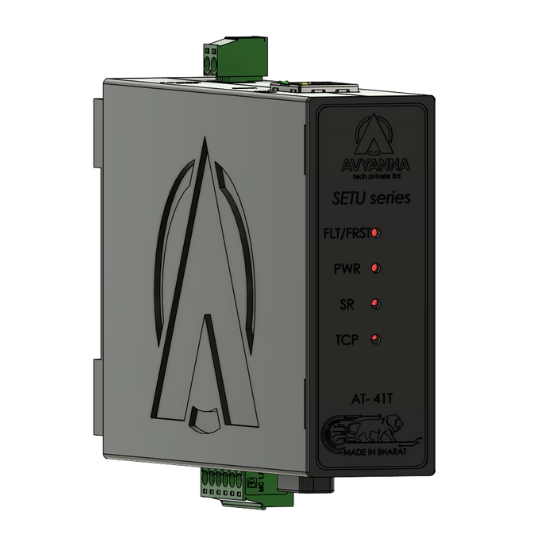
Industrial Gateway Server: Key Features to Compare
An industrial gateway server sits at the center of nearly every modern automation network – translating between protocols, connecting legacy equipment to new systems, and routing data between the plant floor and higher-level SCADA, MES, or cloud platforms. But “industrial gateway server” covers a wide range of hardware, from simple single-protocol converters to multi-port units capable of running edge analytics alongside protocol translation. Choosing the wrong one can mean bottlenecked data, incompatible equipment, or a unit that can’t scale as your network grows.
Whether you’re connecting legacy PLCs through a Modbus gateway, bridging serial and Ethernet networks, or building a facility-wide IIoT data pipeline, the specific features of the gateway you choose directly determine what equipment it can support and how much your automation network can grow before requiring a replacement.
This buying guide walks through the key features to compare before purchasing an industrial gateway server, so you can match the hardware to your actual protocol, port, and scalability requirements.
What Is an Industrial Gateway Server?
An industrial gateway server is a networking device that translates communication between different industrial protocols, network types, or physical interfaces – allowing equipment that wouldn’t otherwise be able to communicate to share data on the same network. Common functions include:
- Protocol translation – converting between Modbus, BACnet, OPC UA, EtherNet/IP, PROFINET, and other industrial protocols
- Serial-to-Ethernet bridging – connecting RS-232/422/485 devices to Ethernet-based networks
- Data aggregation – collecting data from multiple field devices and presenting it through a single network connection
- Edge processing – in more advanced units, performing local data logging, filtering, or basic analytics before forwarding data upstream
A Modbus gateway is one of the most common specific types of industrial gateway server, dedicated to converting Modbus RTU (serial) communication into Modbus TCP (Ethernet) format, or vice versa – a frequent requirement given how widely Modbus is used across legacy industrial equipment.
Key Features to Compare When Buying an Industrial Gateway Server
1. Protocol Support
The single most important factor is whether the gateway supports the specific protocols your equipment uses. Confirm support for:
- Modbus RTU/TCP – for legacy PLCs, sensors, and metering equipment (a dedicated Modbus gateway is often the right fit here)
- OPC UA – increasingly standard for modern SCADA and MES integration
- EtherNet/IP or PROFINET – common in facilities standardized on Allen-Bradley or Siemens equipment
- BACnet – relevant for building automation and HVAC integration
Buying a gateway that supports only the protocols you currently use – without room for protocols you may need later – is one of the most common mistakes in gateway selection.
2. Port Count and Types
Compare how many serial ports (RS-232/422/485), Ethernet ports, and any additional interfaces (USB, digital I/O) the unit offers. A facility with a handful of legacy devices may only need a single or dual-port gateway, while larger deployments benefit from multi-port units (8, 16, or more ports) that consolidate several connections through one unit.
3. Processing Power and Edge Capability
Basic industrial gateway servers simply pass data through with protocol translation. More advanced units include enough processing power to run local edge analytics, data logging, or even lightweight SCADA functions directly on the gateway – reducing the load on upstream servers and enabling faster local decision-making.
4. Network Redundancy Features
For critical applications, look for gateways supporting redundant Ethernet connections, ring network topologies, or failover configurations, ensuring communication continues even if a primary network path fails.
5. Security Features
As industrial gateway servers increasingly bridge OT (operational technology) and IT networks, security features matter more than ever. Compare options for:
- VLAN support for network segmentation
- Firewall or access control list (ACL) capability
- VPN support for secure remote access
- Firmware update and patch management processes from the manufacturer
6. Environmental and Mounting Specifications
Since most industrial gateway servers are installed in control cabinets or on the factory floor rather than in climate-controlled server rooms, compare:
- Operating temperature range (wide-range units often support -20°C to 60°C or beyond)
- DIN-rail vs. rack-mount options
- Enclosure rating for dust and moisture resistance
- Power input flexibility (wide-range DC input is common for industrial deployments)
7. Scalability and Firmware Update Support
Choose a gateway platform that can scale with your network – supporting firmware updates for new protocols, additional connected devices, or expanded functionality – rather than requiring a full hardware replacement as your automation needs grow.
Industrial Gateway Server Feature Comparison Checklist
| Feature | Basic Gateway | Advanced Gateway |
| Protocol support | Single protocol (e.g., Modbus only) | Multi-protocol (Modbus, OPC UA, EtherNet/IP, etc.) |
| Port count | 1-2 ports | 8-16+ ports |
| Edge processing | None or minimal | Local analytics, data logging capability |
| Network redundancy | Not typically supported | Redundant Ethernet, ring topology support |
| Security features | Basic or none | VLAN, firewall, VPN support |
| Environmental rating | Standard indoor rating | Wide temperature range, DIN-rail rugged design |
| Best suited for | Small deployments, single-device bridging | Facility-wide networks, mixed legacy/modern equipment |
When a Dedicated Modbus Gateway Is the Right Choice
Not every facility needs a full multi-protocol industrial gateway server. If your primary requirement is connecting Modbus RTU devices – PLCs, meters, sensors – to a Modbus TCP network, a dedicated Modbus gateway is often a simpler, more cost-effective solution than a broader multi-protocol platform. Dedicated Modbus gateways are purpose-built for this specific translation, typically offering:
- Straightforward configuration focused entirely on Modbus register mapping
- Lower cost compared to multi-protocol industrial gateway servers
- Reliable, well-established protocol handling for one of the most widely used industrial standards
If your facility’s protocol needs are likely to expand beyond Modbus in the future, however, investing in a more flexible multi-protocol gateway server upfront can avoid a hardware replacement down the line.
Common Mistakes to Avoid When Buying an Industrial Gateway Server
- Underestimating future protocol needs – choosing a single-protocol unit when a facility is likely to add different equipment types later
- Ignoring port scalability – buying a gateway with just enough ports for current needs, with no room to add devices
- Overlooking environmental requirements – installing a standard-rated gateway in a cabinet that experiences temperature extremes or vibration
- Skipping security features – treating OT network security as optional, increasing exposure once the gateway bridges to broader IT infrastructure
- Choosing based on price alone – selecting the cheapest available unit without confirming it supports the specific protocols and port count actually required
Frequently Asked Questions
What is an industrial gateway server used for?
An industrial gateway server is used to translate communication between different industrial protocols and network types, allowing equipment like PLCs, sensors, and legacy serial devices to connect to Ethernet-based networks, SCADA systems, and cloud or edge platforms.
What is the difference between an industrial gateway server and a Modbus gateway?
An industrial gateway server typically refers to a broader class of hardware supporting multiple protocols (Modbus, OPC UA, EtherNet/IP, BACnet, etc.), while a Modbus gateway is a more specific device dedicated to converting Modbus RTU serial communication into Modbus TCP Ethernet format, or vice versa.
How many ports does an industrial gateway server need?
Port requirements depend on how many devices need to connect. Small deployments with a handful of legacy devices may only need a single or dual-port gateway, while larger facilities often benefit from multi-port units supporting 8, 16, or more connections through one unit.
Can an industrial gateway server support both legacy and modern equipment?
Yes. Most industrial gateway servers are specifically designed to bridge legacy serial-based equipment (using protocols like Modbus RTU) with modern Ethernet-based networks and protocols like OPC UA or EtherNet/IP, allowing both to coexist on the same network.
What security features should an industrial gateway server have?
Look for VLAN support for network segmentation, firewall or access control capabilities, VPN support for secure remote access, and a manufacturer that provides regular firmware updates to address emerging security vulnerabilities.
Choose the Right Gateway for Where Your Network Is Headed
Selecting an industrial gateway server isn’t just about solving today’s connectivity problem – it’s about choosing hardware that can scale as your protocols, port requirements, and security needs evolve. Whether you need a dedicated Modbus gateway for straightforward serial-to-Ethernet conversion or a full multi-protocol platform for a growing facility-wide network, matching the feature set to your actual requirements avoids costly replacements down the line.
At Avyanna Tech, we help engineers and system integrators compare and select the right industrial gateway server for their specific protocol, scalability, and environmental requirements. Contact us to explore our full range of gateway and Modbus gateway solutions and build a network foundation that grows with your facility.



[email protected]