Rolling Display Buying Guide: Features to Consider for Factory Floor Visibility
Rolling Display Buying Guide: Features for Factory Floor Visibility
Walk onto most factory floors and you’ll spot the same communication problem: production targets pinned to a notice board nobody reads, or an announcement shouted over machine noise that half the shift misses. A rolling display fixes this by putting real-time information exactly where operators can see it, without needing anyone to stop and check a screen.
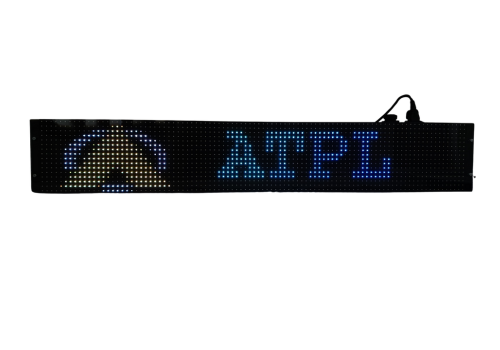
A rolling display is an LED signage unit that presents scrolling or fixed text and visuals, designed for high visibility even under harsh factory lighting and from a distance. It’s become standard equipment on shop floors for showing production counts, safety alerts, shift changes, and quality metrics as they happen.
But not every rolling display is built for factory conditions. Buying one for a retail storefront and expecting it to survive dust, heat, and 24×7 runtime on a manufacturing line is where a lot of procurement decisions go wrong. Here’s what actually matters when you’re choosing one for the floor.
What Makes a Rolling Display Different from a Regular LED Sign
A standard LED sign is built for indoor, climate-controlled spaces with predictable lighting. A factory-grade rolling display has to handle dust, vibration, temperature swings, and long duty cycles without failing.
The difference usually comes down to three things: enclosure rating, operating temperature range, and duty cycle rating. A display rated for 0–60°C operation and 10–90% relative humidity tolerance will keep running through a summer shift near a furnace or a monsoon-humid warehouse, where a consumer-grade unit would throttle or fail.
If your floor has any combination of dust, heat, or moisture – which describes most manufacturing environments – this distinction isn’t optional. It’s the difference between a display that lasts years and one you’re replacing every few months.
Brightness and Viewing Angle: The Non-Negotiables
A rolling display is only useful if people can actually read it from where they’re standing or working. Two specs decide that: brightness and viewing angle.
Look for brightness rated above 1000 MCD for indoor factory use, and higher still if the display sits near windows, loading bays, or outdoor-facing walls. Anything dimmer washes out under overhead fluorescent lighting or daylight spilling through a bay door.
Viewing angle matters just as much as brightness. A display with a 120° viewing angle stays legible whether someone’s reading it head-on from a workstation or glancing over from an angle across the aisle. Narrow-angle displays look sharp dead-center and go nearly invisible ten feet to either side – which defeats the purpose on an open factory floor where people approach from every direction.
IP Rating: Match It to Your Actual Floor Conditions
IP65-rated rolling displays are protected against dust ingress and low-pressure water jets, which covers most indoor factory environments – welding bays, machining areas, packaging lines, and anywhere airborne particulates are a daily reality.
If the display will sit near washdown areas, outdoor loading docks, or anywhere it might face direct rain or high-pressure cleaning, confirm the IP rating explicitly rather than assuming “industrial” means “sealed.” UV-protected front glass is also worth checking if the unit will see any direct sunlight exposure over its lifetime, since UV degradation dulls brightness and clarity well before the electronics fail.
Connectivity and Content Control
This is where a lot of buying decisions get overlooked, and it’s usually where day-to-day frustration comes from later. Ask how the display gets updated, and how easily that fits into your existing systems.
An RJ45 Ethernet interface lets you update the display over your factory network instead of relying on manual USB transfers or a technician walking over with a laptop. A Java-based API means the display can pull data automatically from production systems – line counters, quality dashboards, MES software – instead of someone manually retyping numbers every shift change.
If you’re running multiple displays across a large facility, look for units that support remote monitoring and control through an optional IoT module. That lets one person manage messaging across every display on the floor from a single point, rather than physically visiting each unit to push an update.
Multilingual Support for Diverse Workforces
Indian factory floors are rarely single-language environments. A rolling display that supports multiple regional languages – Hindi, Marathi, Kannada, Bengali, Odia, alongside English – ensures safety messages and production updates actually reach every operator, not just the ones fluent in the language the message happens to be written in.
Check character limits per language too. English messages typically allow more characters than regional scripts on the same display, which affects how much information you can fit into a single scroll cycle before it needs to wrap or repeat.
Power Consumption and Runtime Reliability
Factory floors run displays continuously, often across multiple shifts without downtime. A rolling display drawing excessive power adds up fast across a facility running several units around the clock, and units without stable internal power regulation are more prone to component wear from voltage fluctuation on factory electrical lines.
Look for displays with a built-in SMPS (switched-mode power supply) for stable input handling and moderate power draw — around 50W is a reasonable benchmark for a mid-size industrial rolling display designed for 24×7 operation. This matters more than it sounds: unstable input voltage is one of the more common reasons LED displays fail early in industrial settings, well before the LEDs themselves wear out.
Common Mistakes When Choosing a Rolling Display
Buying on brightness alone. A bright display with a narrow viewing angle or weak enclosure rating still fails on a real factory floor. Balance brightness against IP rating, viewing angle, and duty cycle together.
Ignoring integration requirements. If your production data lives in an MES or ERP system, a display without API-based connectivity means someone manually updates numbers by hand, which defeats the purpose of real-time visibility.
Underestimating environmental exposure. Displays get placed near doors, machinery, and high-traffic zones during installation planning, then end up facing more dust or heat than anticipated once the floor layout shifts. Rate for the worst realistic condition, not the ideal one.
Overlooking language coverage. A display that only supports English on a floor with a multilingual workforce reduces its own effectiveness, regardless of how bright or well-built it is.
How to Choose the Right Rolling Display for Your Facility
Start with your environment: note the temperature range, dust or moisture exposure, and typical viewing distance in the area where the display will sit. Match brightness and IP rating to those conditions first, before comparing features.
Next, map your connectivity needs. If updates will come from a central system or production database, prioritize Ethernet connectivity and API support over a display that only accepts manual USB updates.
Finally, factor in your workforce. If your floor operates across multiple languages, confirm character limits and language support before finalizing a model, since retrofitting language support after installation usually isn’t possible.
Frequently Asked Questions
1. What is a rolling display used for on a factory floor?
A rolling display shows real-time production data, safety alerts, quality metrics, and shift announcements through scrolling or fixed LED text, keeping information visible to operators without manual updates or printed notices.
2. What IP rating should a factory rolling display have?
IP65 is the standard benchmark for factory-floor use, protecting against dust ingress and water jets. Facilities with washdown areas or outdoor exposure should confirm this rating explicitly rather than assuming general industrial-grade coverage.
3. Can a rolling display connect to factory production systems?
Yes. Displays with an RJ45 Ethernet interface and a Java-based API can pull data directly from MES, ERP, or production monitoring systems, updating automatically instead of requiring manual entry.
4. How bright should a rolling display be for indoor factory use?
Brightness above 1000 MCD is a reasonable baseline for indoor factory lighting conditions, with higher brightness recommended for areas near windows, bay doors, or outdoor-facing installations.
5. Do rolling displays support multiple languages?
Many industrial rolling displays support multiple regional languages, including Hindi, Marathi, Kannada, Bengali, and Odia alongside English, which matters for facilities with multilingual workforces.
6. How much power does a factory rolling display consume?
A mid-size industrial rolling display with a built-in SMPS typically consumes around 50W, making continuous 24×7 operation manageable across multiple units without excessive energy costs.
7. What operating temperature range should an industrial rolling display support?
Look for a range of at least 0–60°C with humidity tolerance from 10–90% RH, which covers most Indian factory conditions including heat near machinery and monsoon-season humidity.
8. Can rolling displays be monitored remotely across multiple locations?
Yes, displays equipped with an optional IoT module support remote monitoring and control, letting a single administrator manage content across multiple displays from one point instead of updating each unit manually.
Get Expert Guidance on Choosing Your Rolling Display
Picking the right rolling display comes down to matching real specifications to your actual floor conditions, not just comparing brightness numbers on a spec sheet. Avyanna Tech‘s industrial rolling display range, including the TARANGA and AT-6 series, is engineered for 24×7 factory runtime with IP65 protection, multilingual support, and Ethernet-based content control.
If you’re evaluating options for your facility, reach out to our technical team for product recommendations, technical specifications, or a quotation suited to your factory floor’s exact conditions.
[email protected]