
Industrial Panel PC Buying Guide: Key Specifications to Compare Before Purchase
Industrial Panel PC Buying Guide: Specs to Compare
An industrial panel pc looks straightforward on a spec sheet – a screen size, a processor, a few ports – but the details behind those numbers determine whether the unit survives five years on a factory floor or fails within months. With dozens of industrial panel pc manufacturers offering seemingly similar units at a wide range of price points, comparing the right specifications is what actually separates a reliable long-term investment from an expensive mistake.
This buying guide breaks down the specific specifications worth comparing before purchase – display, processing, environmental rating, connectivity, and mounting – along with how to evaluate whether you’re looking at the best industrial panel pc company for your specific application, not just the lowest quote.
Why Spec Comparison Matters More for Industrial Panel PCs Than Consumer Displays
A consumer monitor or all-in-one PC is judged mostly on resolution and price. An industrial panel pc is judged on how well it survives its operating environment while still performing its control and display functions reliably – which means the specifications that matter most often aren’t the ones listed first on a marketing page. Comparing units purely on processor speed or screen size, without factoring in environmental rating and build quality, is one of the most common mistakes buyers make.
Key Specifications to Compare Before Buying an Industrial Panel PC
1. Display Size, Resolution, and Touch Technology
Match screen size to viewing distance and the amount of information the HMI software needs to display – larger, data-dense SCADA screens typically need bigger displays than simple status panels. For touch technology, resistive touchscreens work reliably with gloved hands, while projected capacitive (PCAP) touch offers a smoother, multi-touch experience better suited to cleaner environments without heavy glove use.
2. Processor and Memory
Match processing power to the actual workload. A unit functioning purely as an HMI display for a PLC needs far less processing headroom than one running local SCADA software, edge analytics, or data logging. Compare available processor tiers (from low-power Atom/Celeron options to higher-performance Core i-series) rather than defaulting to the most powerful – and most expensive – option available.
3. Environmental Rating (IP Rating)
The IP rating on the front bezel indicates dust and liquid resistance – IP65 is common for general factory floor use, while IP66 or IP69K may be necessary for washdown environments in food and beverage or pharmaceutical facilities. Compare whether the rating applies to the front panel only or the entire enclosure, since rear-panel exposure matters in some mounting configurations.
4. Operating Temperature Range
Compare the manufacturer’s rated operating temperature range against your facility’s actual conditions, including any additional heat generated by nearby machinery or direct sunlight in outdoor installations. Extended-range units, often rated -20°C to 60°C or wider, provide a margin of safety that standard-range units don’t.
5. Cooling Design (Fanless vs. Fan-Cooled)
Fanless designs eliminate a common mechanical failure point and reduce the risk of dust ingress through a cooling fan’s airflow. Compare whether a fanless model provides sufficient passive cooling for your processor tier, since higher-performance processors sometimes require active cooling that a fanless chassis can’t support.
6. I/O and Connectivity
Compare the specific mix of ports available – Ethernet, USB, serial (RS-232/422/485), and digital I/O – against what your PLCs, sensors, and network infrastructure actually require. Units with insufficient I/O options often require additional adapter hardware, adding cost and potential points of failure.
7. Mounting Options
Compare VESA, panel-mount, rack-mount, and arm-mount compatibility against your existing or planned cabinet layout, since retrofitting a unit with the wrong mounting style can require costly cabinet modifications.
8. Certifications
Compare available certifications – CE, FCC, UL, and industry-specific certifications like ATEX for hazardous areas – against what’s required for your industry and region before purchase, not after installation.
9. Product Lifecycle and Long-Term Availability
Compare how long each manufacturer commits to keeping a specific model in production. Industrial systems often run 10-15 years, and sourcing identical replacement units years later depends entirely on the manufacturer’s lifecycle policy – a specification rarely listed prominently but critical for long-term planning.
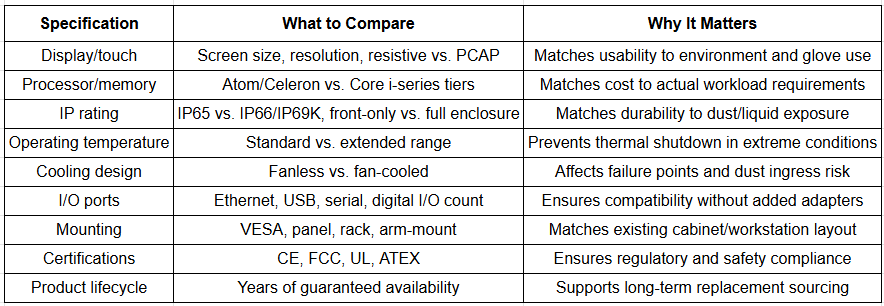
Industrial Panel PC Specification Comparison Checklist
How to Evaluate Industrial Panel PC Manufacturers
Specifications only tell part of the story – the manufacturer behind the hardware affects long-term reliability, support, and total cost of ownership just as much as the spec sheet itself. When comparing industrial panel pc manufacturers, consider:
- Manufacturing quality and consistency: Established manufacturers typically maintain tighter quality control across production runs, reducing the risk of early failures or inconsistent units.
- Technical support and documentation: Compare the availability of installation guides, driver support, and responsive technical assistance, especially for custom configurations.
- Customization capability: Some applications require non-standard screen sizes, specific I/O configurations, or custom branding – confirm the manufacturer can accommodate these needs if relevant.
- Warranty terms: Compare warranty length and what it actually covers, since industrial hardware warranties vary significantly between manufacturers.
- Track record in your industry: A manufacturer with proven deployments in similar industrial environments (food processing, automotive, oil and gas, etc.) is more likely to understand your specific requirements.
- Regional support and lead times: For facilities needing fast replacement parts or local technical support, a manufacturer with regional presence often provides a meaningful advantage over an overseas-only supplier.
What Makes the Best Industrial Panel PC Company for Your Application
There isn’t a single “best” industrial panel pc company across every use case – the right choice depends on matching a manufacturer’s strengths to your specific requirements. That said, the strongest candidates typically share a few common traits:
- A broad product range covering multiple screen sizes, processor tiers, and IP ratings, avoiding the need to compromise on specifications
- Transparent specification sheets that clearly list IP ratings, operating temperature ranges, and certification details rather than vague marketing claims
- A demonstrated commitment to long-term product availability, rather than frequently discontinuing and replacing model lines
- Responsive pre-sales technical support that helps match hardware to your specific application before purchase, not just after
- Positive references or case studies from facilities with similar operating conditions to your own
Common Mistakes When Comparing Industrial Panel PCs
- Focusing only on price without accounting for total cost of ownership, including expected lifespan and replacement frequency
- Overestimating processing needs, paying for high-performance processors when the application only requires basic HMI display functions
- Underestimating environmental exposure, selecting a lower IP rating than the installation site actually requires
- Ignoring mounting compatibility, discovering after purchase that the unit doesn’t fit existing cabinet cutouts or arm mounts
- Not confirming long-term availability, resulting in sourcing difficulties when a replacement unit is needed years later
Frequently Asked Questions
What specifications matter most when buying an industrial panel PC?
The most important specifications include IP rating for environmental protection, operating temperature range, processor and memory suited to the actual workload, available I/O ports, mounting compatibility, and the manufacturer’s long-term product availability commitment.
What IP rating should an industrial panel PC have?
Most general factory floor applications require at least an IP65-rated front panel for dust and splash resistance, while washdown environments in food and beverage or pharmaceutical facilities typically require IP66 or IP69K ratings.
How do I choose between industrial panel PC manufacturers?
Compare manufacturing quality and consistency, technical support responsiveness, customization capability, warranty terms, industry-specific track record, and long-term product lifecycle commitments – not just the listed price or specifications alone.
Is a fanless industrial panel PC better than a fan-cooled model?
For most industrial environments, yes. A fanless design eliminates a common mechanical failure point and prevents the fan-driven airflow that pulls dust into the enclosure, though very high-performance processing workloads may require active cooling that a fanless chassis can’t support.
How long should an industrial panel PC last?
With a properly matched IP rating and operating temperature range, an industrial panel PC is generally designed to operate reliably for 5 to 10 years or more, depending on usage intensity and environmental exposure.
Compare Specifications, Not Just Price
Choosing the right industrial panel pc comes down to comparing the specifications that actually determine reliability in your specific environment – IP rating, operating temperature range, processing power matched to workload, and long-term availability – rather than comparing units on price or screen size alone. The right industrial panel pc manufacturers will make these specifications clear and help you match hardware to your actual application before you buy.
At Avyanna Tech, we help engineers and system integrators compare industrial panel pc specifications and select the right unit for their environment, application, and long-term reliability needs. Contact us to explore our full range of industrial panel PCs and get a hardware match built around your actual requirements, not just a spec sheet.
[email protected]