
5 Signs Your Factory Needs a Rugged Panel PC Upgrade
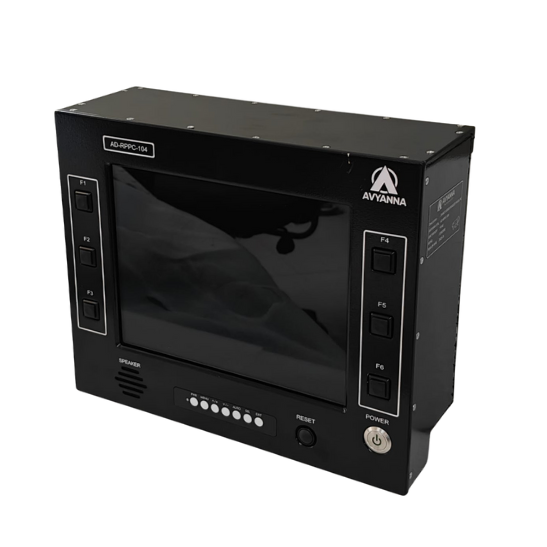
5 Signs You Need a Rugged Panel PC Upgrade
A rugged panel pc doesn’t fail all at once – it usually degrades gradually, showing warning signs weeks or months before a complete breakdown forces an unplanned replacement. Recognizing those signs early gives maintenance and engineering teams the chance to plan an upgrade proactively, rather than scrambling to source a replacement during a production outage.
Many facilities keep running an aging panel PC well past its practical service life simply because it hasn’t failed completely – but “still working” and “working reliably” aren’t the same thing, especially when a struggling unit is quietly costing more in downtime, maintenance calls, and lost productivity than a planned upgrade would.
Here are five clear signs it’s time to upgrade to a rugged panel PC built for your facility’s actual operating conditions.
Sign 1: Frequent Freezes, Crashes, or Unexpected Restarts
If a panel PC is locking up, restarting on its own, or requiring regular manual reboots to keep working, something inside the unit is struggling – often overheating from accumulated dust, a failing internal component, or a processor that’s simply undersized for the software now running on it. These interruptions cost more than just annoyance; each freeze or restart during production is lost visibility into a process that needs continuous monitoring.
What this signals: Internal components approaching end-of-life, or a mismatch between current software demands and the unit’s original processing specifications.
Sign 2: Dim, Flickering, or Discolored Display
A screen that’s noticeably dimmer than when it was installed, flickers intermittently, or shows discoloration in certain areas is showing classic signs of backlight degradation or internal display component wear – both common after years of continuous operation. In control rooms and production areas where operators rely on clear visibility of alarms, process data, or quality indicators, a degrading display isn’t just an inconvenience; it’s a growing safety and accuracy risk.
What this signals: Backlight components reaching the end of their rated operational life, often accelerated by years of continuous 24/7 use beyond the original design assumptions.
Sign 3: Touchscreen Response Has Become Unreliable
If operators are pressing harder, tapping multiple times, or noticing specific screen areas that no longer register touch input accurately, the touchscreen surface has likely worn beyond its reliable service life. This is especially common on older resistive touchscreens subjected to years of high-frequency use, particularly in facilities where operators wear gloves that accelerate surface wear.
What this signals: Touch technology reaching its cycle-count limit, or an original touch technology choice that wasn’t well-matched to the facility’s actual usage patterns (like glove use).
Sign 4: Visible Dust, Corrosion, or Physical Damage to the Enclosure
A panel PC showing dust accumulation around seams, corrosion on the housing, or visible wear on seals and gaskets is likely no longer providing the environmental protection it was originally rated for. Once seals degrade, dust and moisture ingress accelerates rapidly, meaning the unit’s internal reliability is likely declining faster than its outward appearance suggests.
What this signals: Enclosure seals and gaskets have degraded past their effective service life, compromising the unit’s original IP rating and accelerating internal component wear.
Sign 5: The Unit No Longer Supports Current Software or Connectivity Needs
Even a physically functioning panel PC can become a liability if it can’t run updated HMI software, lacks sufficient processing power for new analytics or edge computing requirements, or doesn’t have the I/O ports needed to connect newer sensors or equipment. This is a common but often overlooked sign – the hardware hasn’t failed, but it’s holding back the facility’s broader automation or Industry 4.0 initiatives.
What this signals: The unit’s original specifications no longer match current operational requirements, regardless of its physical condition.
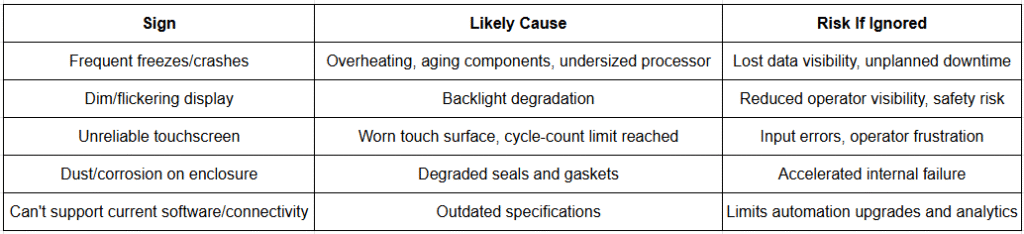
Signs You Need a Rugged Panel PC Upgrade: Quick Reference
Why Delaying a Rugged Panel PC Upgrade Often Costs More
It’s tempting to keep running an aging unit until it fails completely, since replacement involves upfront cost and installation effort. But each of the signs above typically represents an accelerating decline, not a stable plateau – a unit showing early warning signs is significantly more likely to fail at an inconvenient time, often during peak production, than one replaced proactively. Factoring in the cost of unplanned downtime, expedited replacement shipping, and potential lost production, a planned upgrade is frequently the more cost-effective path over the following 12-24 months.
What to Look for When Upgrading to a New Rugged Panel PC
- Match IP rating to current environmental exposure: Reassess actual dust and moisture conditions, which may have changed since the original unit was installed years ago.
- Right-size processing power for current and near-future software: Choose a processor tier with enough headroom for planned software updates or added analytics capability.
- Choose touch technology suited to actual usage patterns: Projected capacitive (PCAP) touch for clean environments and multi-touch needs, or glove-compatible resistive touch for facilities where operators regularly wear PPE.
- Confirm sufficient I/O for current and planned connectivity: Verify Ethernet, USB, and serial port availability matches both existing equipment and anticipated future additions.
- Verify long-term product availability: Choose a manufacturer with a track record of extended product lifecycles, reducing the likelihood of facing this same upgrade decision again in just a year or two.
- Confirm mounting compatibility: A replacement unit with matching VESA or panel-mount dimensions simplifies installation into existing cabinet cutouts.
Frequently Asked Questions
How do I know if my panel PC needs to be replaced?
Common signs include frequent freezes or unexpected restarts, a dim or flickering display, an unreliable touchscreen, visible dust or corrosion on the enclosure, and an inability to support current software or connectivity requirements – any of these suggest the unit is nearing or past its reliable service life.
How long does a rugged panel PC typically last?
A properly specified rugged panel PC is generally designed to last 5 to 10 years or more in continuous industrial use, though actual lifespan depends on environmental exposure, usage intensity, and how well the original specifications matched the operating conditions.
Is it cheaper to repair or replace an aging rugged panel PC?
This depends on the specific issue and unit age, but once multiple warning signs appear simultaneously – display degradation, touchscreen wear, and enclosure damage together – a full replacement is often more cost-effective than repeated repairs, especially when factoring in the risk of unplanned downtime from further component failures.
Can an old rugged panel PC hold back automation upgrades?
Yes. Even a physically functioning panel PC can lack the processing power, I/O ports, or software compatibility needed to support newer sensors, analytics platforms, or Industry 4.0 initiatives, making a hardware upgrade necessary to unlock those capabilities.
What causes a rugged panel PC touchscreen to become unresponsive?
Touchscreen unresponsiveness is typically caused by the touch surface reaching its rated cycle-count limit after years of continuous use, sometimes accelerated by heavy glove use if the original touch technology wasn’t well-matched to the facility’s actual operating conditions.
Plan the Upgrade Before the Failure Forces It
Recognizing these five signs early – performance instability, display degradation, touchscreen wear, enclosure damage, and outdated specifications – gives your facility the chance to plan a rugged panel pc upgrade on your own timeline, rather than reacting to an unplanned failure during production. In most cases, the cost of proactive replacement is lower than the combined cost of downtime, expedited shipping, and lost productivity that comes with waiting for complete failure.
At Avyanna Tech, we help facilities evaluate aging panel PC installations and select the right rugged panel PC upgrade for their current and future operating requirements. Contact us to explore our full range of rugged panel PCs and plan your upgrade before an unplanned failure plans it for you.
[email protected]