
When Should You Replace a Serial Device with a Serial Device Server?
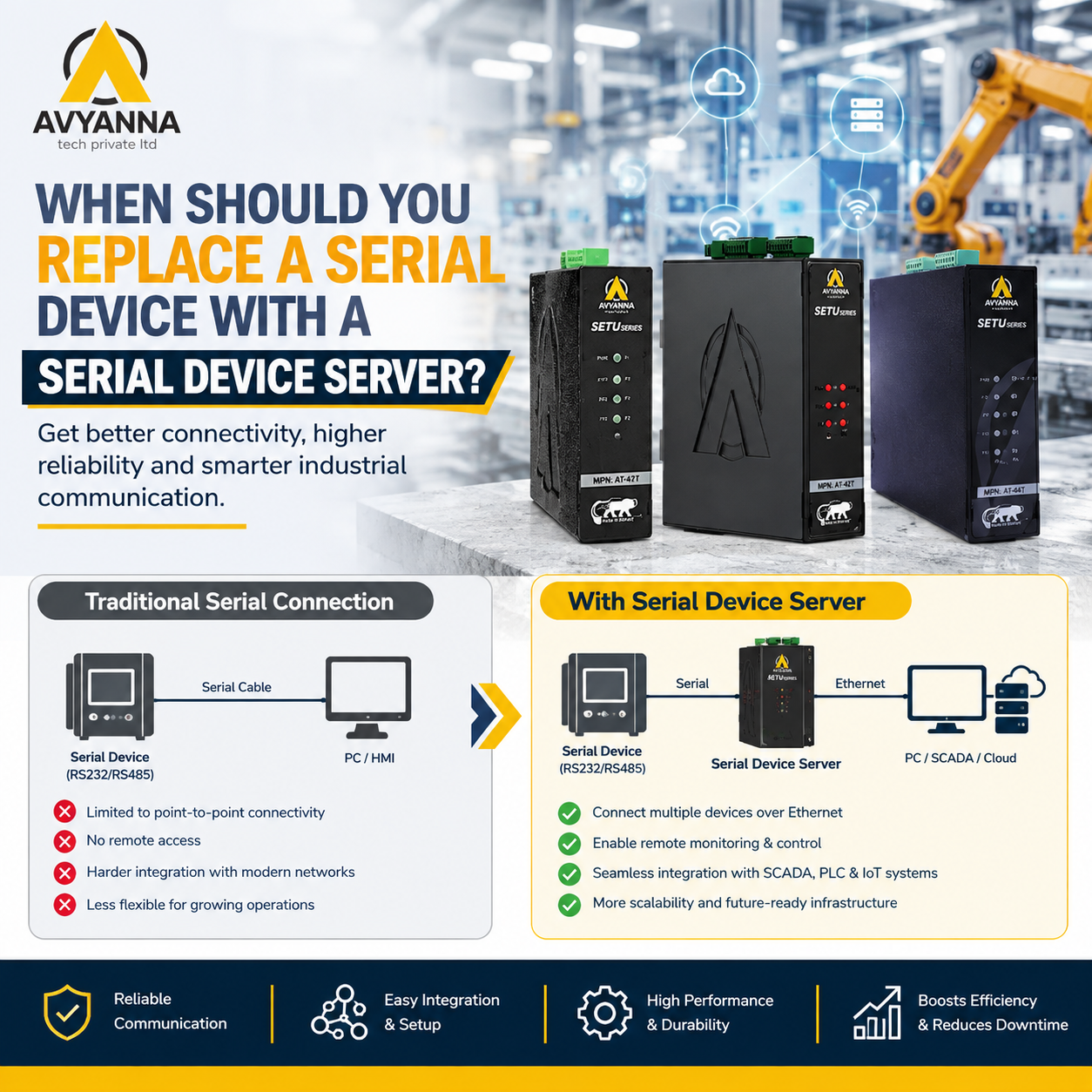
When to Add a Serial Device Server to Your Network
A device communicating over a direct serial connection isn’t automatically a problem – plenty of legacy equipment runs reliably for years on a simple point-to-point RS-232 or RS-485 link with no network involvement at all. The question isn’t whether serial communication itself is outdated; it’s whether a specific device’s isolation from the network has started costing more than it saves. A serial device server solves that problem by bridging the device onto the network, but knowing exactly when that switch is worth making – rather than leaving a working direct connection alone – comes down to a handful of practical triggers.
This article walks through the specific signs that indicate it’s time to add a serial device server to a piece of equipment currently running on a direct serial connection, and just as importantly, when leaving things as they are is still the right call.
Why “If It’s Not Broken, Don’t Fix It” Doesn’t Always Apply Here
Serial devices connected directly to a nearby PC or controller often work fine for years without any network involvement. The temptation is to leave well enough alone – but this reasoning misses the actual cost of isolation: every serial device that isn’t networked represents a blind spot in centralized monitoring, a manual process someone has to maintain, or a physical visit required every time data needs to be checked. A serial device server doesn’t fix something that’s broken; it removes a limitation that’s been quietly accepted as normal.
Signs It’s Time to Add a Serial Device Server
1. Someone Has to Physically Visit the Device to Get Data
If checking a device’s status or downloading its data requires walking to its physical location and connecting a laptop, that’s a direct cost in labor time – repeated every single time the data is needed. A serial device server makes that same data accessible remotely, from a control room, another building, or off-site, eliminating the recurring physical visit entirely.
2. The Device’s Data Needs to Feed a Centralized System
If a device’s readings, status, or alarms need to appear in a SCADA dashboard, historian database, or centralized reporting system – but currently don’t, because the device is isolated on a direct serial connection – a serial device server is the most direct way to close that gap without replacing the device itself.
3. Multiple People Need Access to the Same Device
A direct serial connection is inherently single-user – whoever has the physical cable connected has access, and no one else does at the same time. If multiple technicians, shifts, or departments need to check or configure the same device, a serial device server with virtual COM port support allows simultaneous or sequential remote access without anyone needing to physically disconnect and reconnect a cable.
4. The Device Is About to Move Further Away from Its Controller
RS-232’s roughly 15-meter distance limit means that any facility layout change – a machine relocation, a new building addition, a longer cable run than originally planned – can suddenly break a previously functioning direct connection. If a device is being moved or a facility is being reconfigured, this is a natural trigger point to add a serial device server rather than trying to extend a direct RS-232 cable beyond its reliable limit.
5. The Facility Is Undergoing a Broader Connectivity or Industry 4.0 Initiative
When a facility is investing in network infrastructure upgrades, IIoT platforms, or predictive maintenance initiatives, any remaining directly-connected serial devices become the exceptions holding back full-facility visibility. Adding a serial device server during this kind of broader initiative is typically far more cost-effective than doing it piecemeal later, since the network infrastructure and planning effort are already underway.
6. Manual Data Transcription Is Creating Errors or Delays
If someone is currently reading a value off a device’s local display and manually entering it into a spreadsheet or system elsewhere, that process is both slow and error-prone. A serial device server enables automatic data collection directly from the device, removing the manual transcription step and the errors that come with it.
When to Leave a Direct Serial Connection Alone
Adding a serial device server isn’t automatically the right move for every device. It’s reasonable to leave a direct connection as-is when:
- The device and its connected controller are physically close together and unlikely to move
- Only one person or system ever needs to access the device’s data
- The device’s data doesn’t need to feed into any centralized monitoring or reporting system
- There’s no broader network or Industry 4.0 initiative underway that would make the upgrade more cost-effective
- The device is nearing planned replacement or decommissioning, making the investment in a device server hard to justify
Decision Framework: Serial Device Server or Direct Connection?
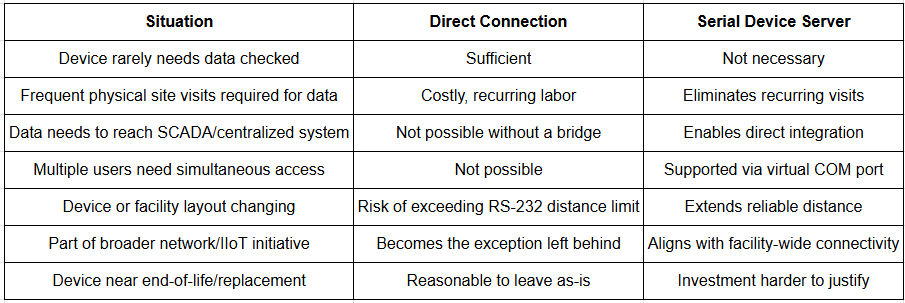
Calculating Whether the Switch Is Worth It
For devices where the signs above apply, it helps to weigh the ongoing cost of the status quo against the one-time cost of a serial device server. A device requiring even a weekly physical site visit for data collection, at even modest labor rates, can accumulate a cost over a year that meaningfully exceeds the price of a single-port serial device server – before accounting for the value of faster access to that data or reduced transcription errors. This calculation tends to favor adding a serial device server more often than facilities initially assume, particularly once recurring labor costs are factored in rather than just the upfront hardware price.
Frequently Asked Questions
When should I replace a direct serial connection with a serial device server?
Consider adding a serial device server when someone has to physically visit a device to retrieve data, when the device’s data needs to feed a centralized SCADA or monitoring system, when multiple users need remote access, when a facility layout change threatens to exceed RS-232’s distance limit, or when a broader network upgrade initiative is already underway.
Is it worth adding a serial device server to just one device?
Yes, if that device requires frequent manual data checks or physical site visits, the recurring labor cost of maintaining a direct connection often exceeds the one-time cost of a single-port serial device server within a relatively short period.
Can a serial device server allow multiple people to access the same device?
Yes. Unlike a direct serial connection, which supports only one physical connection at a time, a serial device server with virtual COM port support allows multiple users or systems to access the same device’s data over the network, simultaneously or sequentially.
What happens if a serial device is moved farther from its controller?
If the new distance exceeds RS-232’s roughly 15-meter limit, a direct connection will no longer function reliably. This is a common and practical trigger point for adding a serial device server, which supports much longer distances through RS485 or network-based communication.
Do I need a serial device server for every serial device in my facility?
No. Devices that are rarely accessed, don’t need to feed centralized systems, and aren’t affected by distance or multi-user access requirements can often remain on a direct serial connection without any real downside.
Make the Switch When the Signs Point to It
Deciding when to add a serial device server comes down to recognizing specific, practical triggers – recurring site visits, centralized data needs, multi-user access requirements, or a facility-wide connectivity push – rather than defaulting to either extreme of replacing every serial device or leaving all of them isolated indefinitely. For the devices where these signs apply, the switch typically pays for itself faster than expected once recurring labor costs are factored in.
At Avyanna Tech, we help facilities evaluate which serial devices are ready for a serial device server upgrade and which can reasonably stay on a direct connection. Contact us to explore our full range of serial device server solutions and make the switch where it actually makes a difference.
[email protected]