
Rugged Panel PC Maintenance: Tips to Increase Lifespan
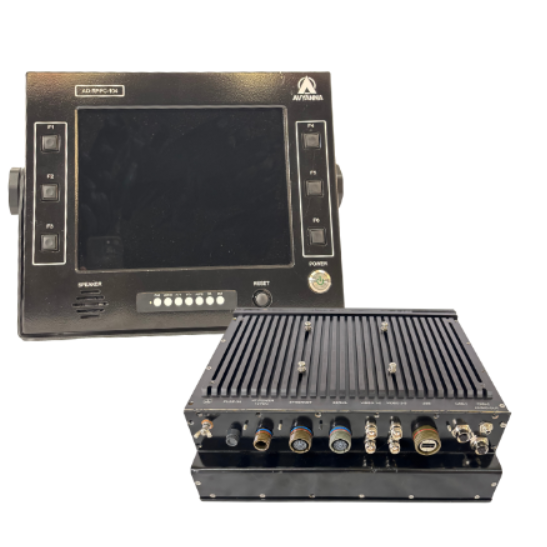
Industrial environments are demanding by nature: dust, vibration, temperature fluctuations, and continuous operation can take a toll on computing equipment. A Rugged Panel PC is specifically designed to handle these challenges, but like any industrial device, its lifespan and performance depend greatly on proper maintenance.
At Avyanna Tech, we work closely with industries that rely on Rugged Panel PCs for critical operations. Based on real-world usage, here are practical maintenance tips to help extend the life and reliability of your system.
Why Maintenance Matters for a Rugged Panel PC
A Rugged Panel PC is built with industrial-grade components, sealed enclosures, and fanless designs to withstand harsh conditions. However, long-term exposure to dust, moisture, heat, and electrical fluctuations can still affect performance over time.
Regular maintenance helps:
- Maintain consistent system performance
- Reduce unexpected downtime
- Extend hardware lifespan
- Protect industrial investments
Even the most durable Rugged Panel PC benefits from periodic checks and preventive care.
1. Keep the Display and Enclosure Clean
Although a Rugged Panel PC often comes with an IP-rated front panel, dust and grime can accumulate on the screen and enclosure over time.
Best practices:
- Clean the touchscreen with a soft, lint-free cloth
- Use approved screen-safe cleaning solutions
- Avoid excessive moisture near ports and connectors
Keeping the enclosure clean helps maintain visibility and prevents dust ingress around seals.
2. Inspect Mounting and Vibration Points
Rugged Panel PCs are frequently mounted on machines, control panels, or arms. Continuous vibration can loosen mounts and connectors.
Maintenance tips:
- Periodically check mounting brackets and fasteners
- Ensure the unit remains securely fixed
- Inspect connectors for signs of wear or loosening
Proper mounting stability reduces mechanical stress on the Rugged Panel PC.
3. Monitor Operating Temperature
Most Rugged Panel PCs are fanless and rely on passive cooling. While this design improves reliability, adequate airflow around the enclosure is still essential.
What to check:
- Ensure ventilation areas are not blocked
- Keep heat-generating equipment at a safe distance
- Monitor ambient temperature within specified limits
Maintaining proper thermal conditions helps protect internal components.
4. Protect Power and I/O Connections
Industrial power environments can be unpredictable. Power fluctuations and unstable connections can impact the Rugged Panel PC over time.
Recommended actions:
- Use proper industrial power supplies
- Ensure secure cable connections
- Periodically inspect I/O ports for dust or corrosion
Stable power and clean connections support consistent operation.
5. Update Software and Firmware Carefully
While hardware durability is a key strength of a Rugged Panel PC, software stability is equally important.
Best practices:
- Apply OS and firmware updates recommended by the manufacturer
- Avoid unnecessary third-party software installations
- Back up system data before updates
Controlled updates help maintain security and system reliability without risking compatibility issues.
6. Regularly Check Touchscreen Performance
In many applications, the touchscreen is the most frequently used component of a Rugged Panel PC.
Maintenance considerations:
- Check touch response accuracy
- Recalibrate if needed
- Inspect for scratches or surface wear
Timely attention ensures smooth operator interaction and avoids productivity issues.
7. Schedule Preventive Inspections
Rather than waiting for issues to occur, scheduled inspections can help identify early signs of wear.
Preventive checks may include:
- Visual inspection of the enclosure and cables
- Performance monitoring during operation
- Verification of system boot and response times
This approach helps extend the Rugged Panel PC’s service life in demanding environments.
How Avyanna Tech Supports Long-Term Reliability
At Avyanna Tech, our Rugged Panel PCs are designed for industrial reliability and long-term deployment. We focus on robust construction, industrial-grade components, and compatibility with real-world operating conditions.
By combining quality hardware with proper maintenance practices, users can maximize the operational life of their Rugged Panel PC while maintaining dependable performance.
Conclusion
A Rugged Panel PC is built to perform in tough industrial environments, but regular and practical maintenance is essential to realize its long-term value fully. Simple actions like cleaning, inspection, thermal management, and software care can significantly improve reliability and lifespan.
With the right maintenance approach and reliable hardware from Avyanna Tech, Rugged Panel PCs can continue to support industrial operations efficiently for years.
[email protected]