
Future-Proof Your Automation System with an Industrial Panel PC
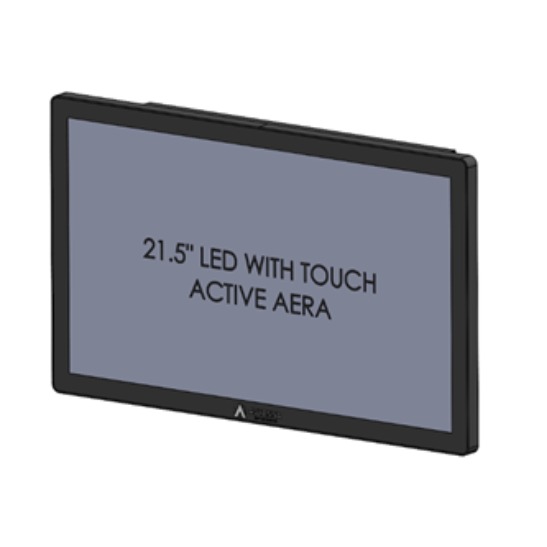
Future-Proof Your Automation System with Industrial Panel PC
Manufacturing floors, process plants, and logistics hubs are changing faster than ever. Sensors multiply, data volumes grow, and control systems are expected to talk to everything from PLCs to cloud dashboards. In the middle of this shift sits one piece of hardware that quietly determines whether your automation strategy holds up over the next decade: the industrial panel PC.
An industrial panel PC is a ruggedized, all-in-one computing device that combines a touchscreen display, processor, memory, and industrial-grade I/O into a single sealed unit designed for harsh environments. Unlike consumer-grade computers, it’s built to withstand dust, vibration, temperature swings, and continuous 24/7 operation on a factory floor. If you’re planning, upgrading, or scaling an automation system, understanding why this device matters – and how to choose the right one – can save you years of downtime, replacement costs, and integration headaches.
This guide breaks down what makes an industrial panel PC essential to modern automation, the risks of ignoring it, and the practical steps to future-proof your system starting today.
What Is an Industrial Panel PC and Why Does It Matter?
An industrial panel PC is a self-contained computer with an integrated touch display, typically mounted directly onto machinery, control cabinets, or production line stations. It merges the roles of monitor, computer, and human-machine interface (HMI) into one compact, sealed enclosure.
Unlike a standard desktop paired with an external monitor, an industrial panel PC is engineered from the ground up for demanding conditions:
- Sealed, fanless designs rated IP65/IP66 to resist dust, oil, and water ingress
- Wide operating temperature ranges (often -20°C to 60°C or beyond) for hot factories, cold storage, or outdoor installations
- Vibration and shock resistance for use near heavy machinery, conveyors, or mobile equipment
- Long product lifecycles, so the same model remains available for repeat orders and replacements for years
- Extended I/O options, including RS-232/485, USB, Ethernet, and digital I/O for connecting PLCs, sensors, and legacy equipment
In short, an industrial panel PC is the control hub where operators interact with automated systems – and where system longevity is either built in or left to chance.
Why Automation Systems Fail Without the Right Hardware
Many automation projects are designed around software logic, PLC programming, and network architecture – while the human-machine interface hardware is treated as an afterthought. That’s a costly mistake. Common failure points include:
- Consumer-grade hardware breaking down in industrial conditions – dust ingress, overheating, or vibration damage that a sealed industrial unit wouldn’t experience.
- Short product lifecycles – commercial displays and PCs get discontinued within 12–18 months, forcing redesigns when you need a simple replacement.
- Limited I/O compatibility – inability to interface with legacy PLCs, serial devices, or fieldbus protocols common in industrial settings.
- Poor scalability – hardware that can’t handle added sensors, edge computing tasks, or software updates as automation needs grow.
Choosing an industrial panel PC from the outset addresses each of these risks at the hardware layer, rather than patching problems after a costly failure.
Key Features That Make an Industrial Panel PC Future-Proof
1. Modular and Scalable Architecture
Future-proofing isn’t just about durability – it’s about adaptability. Look for panel PCs with modular design options: swappable I/O modules, upgradeable storage, and support for multiple processor tiers (from low-power Atom/Celeron options to higher-performance Core i-series or industrial ARM processors). This allows a single hardware platform to serve everything from a simple HMI display to a full edge-computing node.
2. Wide I/O and Connectivity Support
A future-ready industrial panel PC should support:
- Multiple Ethernet ports for network redundancy
- Serial ports (RS-232/422/485) for legacy PLC and sensor communication
- USB 3.0+ for fast peripheral connections
- Optional Wi-Fi, 4G/5G, and PoE for flexible deployment
- Digital I/O for direct machine signaling
This breadth of connectivity ensures the device can integrate with both legacy equipment and newer IIoT (Industrial Internet of Things) sensors without requiring separate gateway hardware.
3. Rugged Build Quality
An IP65-rated front panel, aluminum or steel chassis, and fanless cooling design reduce mechanical failure points. Fanless operation, in particular, eliminates one of the most common causes of industrial PC failure: dust accumulation and fan motor burnout.
4. Long-Term Availability and Support
Industrial automation systems often run for 10–15 years. Choosing a panel PC from a manufacturer that commits to long-term product availability (rather than consumer electronics’ 1-2 year cycles) means you can source identical replacement units well into the future – critical for validated or regulated production environments.
5. Edge Computing Readiness
As automation shifts toward edge computing – processing data locally before sending it to the cloud – panel PCs increasingly need to handle real-time analytics, predictive maintenance algorithms, and local data logging. Selecting a unit with sufficient processing headroom today prevents a costly hardware overhaul when edge applications expand tomorrow.
Industrial Panel PC vs. Standard Panel PC: What’s the Difference?
| Feature | Industrial Panel PC | Standard/Commercial Panel PC |
| Environmental rating | IP65/IP66 sealed, dust/water resistant | Typically unsealed or low-rated |
| Operating temperature | Extended range (-20°C to 60°C+) | Standard office range (0°C to 40°C) |
| Cooling | Fanless design | Often fan-cooled |
| Lifecycle | 5–10+ years availability | 1–2 years before discontinuation |
| I/O options | Serial, digital I/O, industrial protocols | Limited to standard USB/HDMI |
| Mounting | VESA, panel, rack, or DIN-rail mount | Desktop or basic wall mount |
| Certifications | CE, FCC, UL, often ATEX/hazardous-area options | Consumer certifications only |
This comparison highlights why swapping a commercial-grade computer into an industrial application almost always leads to premature failure and unplanned downtime.
How to Choose the Right Industrial Panel PC for Your Automation System
When evaluating options, consider these practical criteria:
- Environment first: Match the IP rating and temperature range to your actual plant conditions – not just the “typical” spec sheet numbers.
- Screen size and resolution: Match to the operator’s viewing distance and the complexity of your HMI software.
- Touch technology: Resistive touch works well with gloved hands; projected capacitive (PCAP) offers a smoother, multi-touch experience for cleaner environments.
- Processing power: Choose based on whether the unit only displays an HMI or also runs edge analytics, SCADA software, or local databases.
- Certifications: Confirm CE, FCC, UL, and any hazardous-area certifications required for your industry (oil & gas, pharmaceuticals, food processing, etc.).
- Mounting flexibility: VESA, panel-mount, or arm-mount options should match your existing or planned cabinet layout.
- Vendor support: Prioritize suppliers offering long-term availability, technical support, and custom configuration options.
Frequently Asked Questions
What is an industrial panel PC used for? An industrial panel PC is used as a human-machine interface (HMI) and control computer in factories, process plants, and other industrial settings. It displays data, accepts touch input from operators, and connects to PLCs, sensors, and networks to monitor and control automated systems.
How is an industrial panel PC different from a regular computer? An industrial panel PC is built with sealed, fanless enclosures, wider operating temperature tolerances, vibration resistance, and long-term component availability – features a regular consumer PC or monitor does not offer.
Can an industrial panel PC support IIoT and edge computing? Yes. Many industrial panel PCs are equipped with capable processors, ample memory, and industrial connectivity options that allow them to run edge analytics, local data logging, and predictive maintenance software alongside standard HMI functions.
How long does an industrial panel PC typically last? With proper environmental matching and maintenance, industrial panel PCs are designed to operate reliably for 5 to 10 years or more, significantly longer than consumer-grade equivalents.
What IP rating should an industrial panel PC have? Most factory-floor applications call for at least IP65 on the front panel to resist dust and water spray. Washdown environments, such as food and beverage processing, may require IP66 or IP69K ratings.
Building an Automation System That Lasts
Future-proofing your automation system isn’t about buying the most expensive hardware available – it’s about matching your industrial panel PC to your actual operating environment, connectivity needs, and growth plans. A well-chosen unit reduces downtime, simplifies maintenance, and gives your automation architecture the flexibility to absorb new sensors, software, and IIoT capabilities as they arrive.
At Avyanna Tech, we help manufacturers and system integrators select and deploy the right industrial panel pc for their specific application – from rugged HMI displays to edge-ready computing platforms. Contact us to explore our full range of industrial panel PCs and build an automation system designed to perform reliably for years to come.
[email protected]