How to Choose a Rolling Display for Real-Time Factory Production Updates
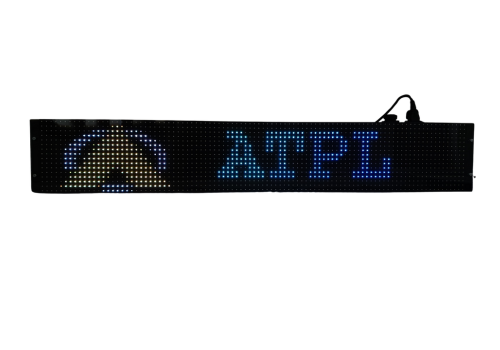
How to Choose a Rolling Display for Factory Updates
In a manufacturing environment, production information needs to be visible where work is happening. A Rolling Display can provide operators and supervisors with continuously visible messages, production updates, safety alerts and other important information without depending on printed notices or manual boards.
But choosing the right rolling display board requires more than simply selecting a bright LED screen. Viewing distance, environmental conditions, connectivity, display effects, language support and remote control capabilities can all affect how useful the display will be.
Here are the key factors to consider before selecting a LED rolling display for your factory.
What Is a Rolling Display?
A rolling display is an electronic display that presents text or information using fixed or scrolling visual effects. In industrial environments, it can be used for factory production status displays, industrial notices, safety messages and real-time information.
For production floors, the main purpose is simple: make important information easy to see and understand at a glance.
1. Check Visibility and Viewing Angle
Production floors can be large, busy spaces where employees may view the display from different positions.
Before purchasing a rolling display, consider:
- Required viewing distance
- Display size
- Brightness
- Viewing angle
- Indoor or outdoor installation
- Lighting conditions around the display
For example, the Avyanna Tech TARANGA Series uses a wide 120° horizontal and vertical viewing angle and high-intensity LED technology for improved visibility.
2. Consider the Factory Environment
A display installed on a production floor may be exposed to dust, moisture, temperature variations or outdoor conditions. Therefore, environmental protection should be part of the selection process.
Look for features such as:
- Dust and water protection
- UV-protected front glass
- Suitable operating temperature
- Humidity tolerance
- Rugged construction
The Avyanna Tech Rolling Display has IP65 protection, UV-protected front glass and an operating temperature range of 0–60°C, making these factors particularly relevant for industrial installations.
3. Choose the Right Connectivity
Connectivity is important when production information needs to be updated from a computer, application or other control system.
An industrial rolling display may need to support interfaces that fit your existing setup. The TARANGA Series provides an RJ45 Ethernet interface and a Java-based API for content integration. An optional IoT module can also be added for remote monitoring and control.
Before choosing a display, ask:
- How will messages be updated?
- Is Ethernet connectivity required?
- Does the display need application-level integration?
- Will remote monitoring be useful?
- Does the display need to work with existing factory systems?
4. Look at Scrolling and Display Effects
For production updates, readability is more important than unnecessary visual effects.
A good LED scrolling display should allow information to be presented clearly using suitable display modes. Avyanna Tech’s Rolling Display supports both fixed and scrolling visual effects, allowing users to select how information appears on the display.
For example, a factory may use:
- Fixed text for a permanent department name
- Scrolling text for production updates
- Short messages for safety alerts
- Dynamic information for operational communication
5. Check Language Support
If your workforce includes employees who communicate in different regional languages, multilingual support can make factory communication more accessible.
The TARANGA Rolling Display supports English, Hindi, Marathi, Odia, Kannada and Bengali. It supports up to 250 characters in English and approximately 70–75 characters in other supported languages.
This can be particularly useful for factories that need to communicate safety instructions, production messages or general announcements to a diverse workforce.
6. Consider Power Consumption and Continuous Operation
A production display may operate for long periods, so power consumption and operating reliability should also be considered.
The Avyanna Tech datasheet specifies 50W power consumption, a built-in switch-mode power supply and suitability for 24×7 runtime.
When comparing products from different LED scrolling display board manufacturers, check the actual power requirements and operating specifications rather than considering display brightness alone.
7. Select a Display That Fits Your Application
Not every factory needs the same type of information display.
A rolling display can be used for:
- Factory production status
- Industrial notice boards
- Safety messages and alerts
- Public information
- Real-time transportation information
- Commercial communication
Avyanna Tech’s TARANGA Series is specifically positioned for industrial and outdoor applications, including factory production status displays and safety communication.
Why Choose an Industrial Rolling Display?
A purpose-built industrial rolling display board can provide several practical advantages over manually updated boards:
- Information can be updated electronically.
- Scrolling messages can communicate longer information within limited display space.
- Bright LED output helps improve visibility.
- Ethernet connectivity supports easier content management.
- Rugged protection is useful for industrial environments.
- Multilingual support can improve communication across diverse teams.
The right choice ultimately depends on where the display will be installed, what information it needs to show and how that information will be managed.
Avyanna Tech Rolling Display for Factory Communication
Avyanna Tech offers the TARANGA Series Multi-Color LED Rolling Display, designed for industrial and outdoor visual communication. The product combines IP65 protection, wide-angle visibility, Ethernet connectivity, fixed and scrolling effects, multilingual support and optional IoT-based remote monitoring and control.
For manufacturers looking for a rolling display for production status, safety communication or industrial announcements, these specifications provide a practical starting point for evaluating the right solution.
Frequently Asked Questions
What is a rolling display used for in a factory?
A rolling display can be used to show production status, safety messages, industrial notices, alerts and other real-time information where employees can easily see it.
What should I check before buying a rolling display?
Check visibility, viewing angle, brightness, environmental protection, connectivity, display effects, language support, power consumption and whether the display supports your required method of content control.
Is an LED rolling display suitable for industrial environments?
Yes, provided the display is designed for the environment in which it will operate. Features such as IP protection, suitable temperature range, rugged construction and continuous-operation capability should be considered.
Can a rolling display support multiple languages?
Some industrial rolling displays support multiple languages. For example, Avyanna Tech’s TARANGA Series supports English, Hindi, Marathi, Odia, Kannada and Bengali.
Can a rolling display be controlled remotely?
The TARANGA Series provides Ethernet connectivity and a Java-based API, while an optional IoT module can enable remote monitoring and control.
Conclusion
Choosing a Rolling Display for factory production updates should be based on more than screen size or appearance. Consider visibility, environmental protection, connectivity, display control, language support, power consumption and continuous operation before making a decision.
For industrial facilities that need clear and dynamic production communication, an appropriately specified LED rolling display can become a practical part of the factory’s visual communication system.
[email protected]