
Industrial Keyboard vs Standard Keyboard: Which Is Right for Your Factory?
Industrial Keyboard vs Standard: Factory Buying Guide
Choosing between an industrial keyboard and a standard office keyboard isn’t always obvious on paper – both look similar, both plug into a PC the same way, and a standard keyboard usually costs less upfront. But on a factory floor, the environment does the deciding for you: dust, spills, vibration, and constant handling expose the real difference between hardware built for an office desk and hardware built for continuous industrial use.
This comparison matters most when specifying equipment for a new production line, control room, or industrial PC workstation, where the wrong choice can mean early hardware failure, unplanned downtime, or an input device that simply can’t keep up with how the equipment is actually used. Whether you need a full industrial PC keyboard for a control room workstation or a compact industrial keypad for a machine-side panel, matching the hardware to the environment is the deciding factor.
This guide compares industrial and standard keyboards directly, so you can determine which fits your factory’s actual operating conditions.
What Separates an Industrial Keyboard from a Standard Keyboard?
The core difference comes down to construction and intended environment. A standard keyboard is built for a climate-controlled office with occasional light use, while an industrial keyboard is engineered for continuous operation in harsh, unpredictable conditions:
- Sealing: Industrial keyboards use sealed membrane construction rated IP65-IP68; standard keyboards have minimal or no sealing against dust and liquid.
- Key switch durability: Industrial-rated switches often handle 10-20 million actuations versus 5-10 million for standard consumer switches.
- Housing material: Industrial keyboards typically use metal-reinforced or heavy-duty composite housings, versus lightweight plastic on standard models.
- Mounting options: Industrial keyboards support panel-mount, rack-mount, or VESA-arm installation; standard keyboards are desktop-only.
- Operating temperature range: Industrial models tolerate extended ranges, often -20°C to 60°C, compared to a standard 10°C to 35°C office range.
- Chemical resistance: Industrial keyboards resist disinfectants and cleaning solvents; standard keyboard plastics degrade under repeated chemical exposure.
Industrial Keyboard vs. Standard Keyboard: Side-by-Side Comparison
| Factor | Industrial Keyboard | Standard Keyboard |
| Sealing rating | IP65-IP68 | None or minimal |
| Expected lifespan (continuous use) | 5-10+ years | 6 months-2 years |
| Key switch durability | 10-20+ million actuations | 5-10 million actuations |
| Mounting | Panel, rack, VESA-mount available | Desktop only |
| Chemical/washdown resistance | Yes | No |
| Vibration/shock tolerance | High | Low |
| Backlighting | Common | Rare |
| Integrated pointing device | Often available (trackpad/trackball) | Requires separate mouse |
| Upfront cost | Higher | Lower |
| Total cost of ownership (industrial setting) | Lower over time | Higher due to frequent replacement |
When a Standard Keyboard Is Still Acceptable
Not every workstation on a factory site needs industrial-grade hardware. A standard keyboard can be a reasonable choice when:
- The workstation is in a climate-controlled office or administrative area away from the production floor
- The device sees light, infrequent use rather than continuous shift-based operation
- There’s minimal exposure to dust, liquids, or cleaning chemicals
- Budget constraints outweigh the risk of more frequent replacement in a low-exposure environment
When You Need an Industrial Keyboard Instead
An industrial keyboard becomes the clear choice when a workstation faces any of the following conditions:
- Direct exposure to dust or airborne particulates, common on production floors, machining areas, or material handling zones
- Regular washdown or chemical cleaning, typical in food and beverage, pharmaceutical, or healthcare-adjacent facilities
- 24/7 or multi-shift operation, where cumulative use far exceeds typical office-hours wear
- Panel or equipment-mounted installation, where a desktop keyboard simply won’t physically fit or mount
- Vibration exposure from nearby machinery, conveyors, or mobile equipment
Industrial PC Keyboard vs. Industrial Keypad: Choosing the Right Form Factor
Not every industrial application calls for a full-size keyboard. Depending on the workstation and task, one of a few common form factors will fit better:
Industrial PC Keyboard
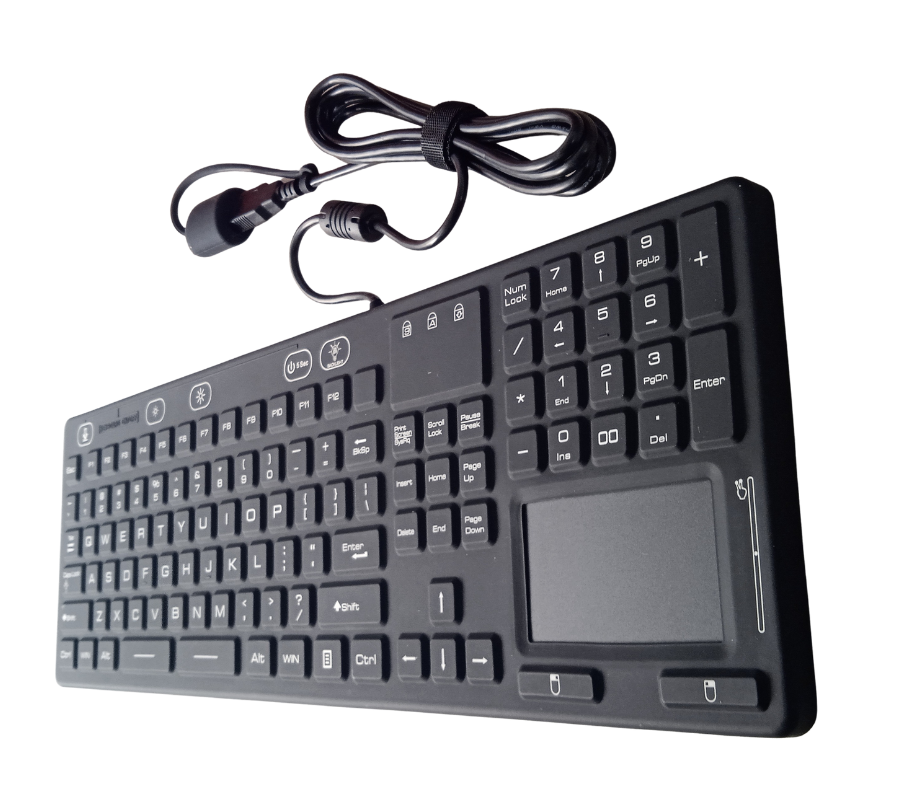
A full-featured industrial PC keyboard includes a complete alphanumeric layout, function keys, and often an integrated pointing device – suited for control rooms, SCADA workstations, and any application requiring full text entry, parameter input, or software navigation.
Industrial Keypad
An industrial keypad is a compact, often numeric-only or limited-function input device, ideal for applications that only require simple data entry, machine setpoint adjustment, or menu navigation – such as directly on a machine panel where space is limited and full keyboard functionality isn’t necessary.
Industrial Keyboard with Touchpad
For control rooms and workstations with limited desk space, an industrial keyboard with touchpad combines full keyboard functionality with an integrated, sealed pointing surface, eliminating the need for a separate mouse. This is especially useful in multi-monitor SCADA setups or washdown environments where an additional loose mouse would introduce contamination risk or clutter.
How to Choose Between an Industrial Keyboard and Standard Keyboard
- Assess the actual environment: Match the decision to real exposure – dust, moisture, chemicals, temperature – rather than a general assumption about the facility.
- Consider usage frequency: Continuous, multi-shift use favors industrial-grade durability regardless of environmental exposure.
- Factor in total cost of ownership: Calculate expected replacement frequency for a standard keyboard against the higher upfront cost of an industrial model.
- Choose the right form factor: A full industrial PC keyboard, a compact industrial keypad, or an industrial keyboard with touchpad – match the form factor to the task and available space.
- Check mounting requirements: Confirm whether the workstation needs panel-mount, rack-mount, or VESA-arm compatibility before selecting a model.
Frequently Asked Questions
What is the difference between an industrial keyboard and a standard keyboard?
An industrial keyboard is built with sealed membrane construction, higher-rated key switches, and rugged housings to withstand dust, liquids, and continuous use, while a standard keyboard is designed for light use in clean, climate-controlled office environments and lacks this environmental protection.
Is an industrial keyboard worth the extra cost for a factory?
In most factory environments, yes. While an industrial keyboard costs more upfront than a standard keyboard, its significantly longer lifespan typically results in lower total cost of ownership once replacement frequency and downtime are factored in.
What is the difference between an industrial PC keyboard and an industrial keypad?
An industrial PC keyboard is a full-featured keyboard with a complete alphanumeric layout for tasks like SCADA navigation and data entry, while an industrial keypad is a smaller, often numeric-only device suited for simple setpoint adjustments or menu navigation on machine panels.
What is an industrial keyboard with touchpad used for?
An industrial keyboard with touchpad combines a full keyboard with a sealed, integrated pointing surface, allowing operators to navigate screens without a separate mouse – useful in space-constrained control rooms or washdown environments where a loose mouse isn’t practical.
Can a standard keyboard be used in a factory setting?
A standard keyboard can be used in low-exposure areas like administrative offices within a facility, but it’s not recommended for production floor use, washdown environments, or continuous multi-shift operation, where dust and liquid exposure typically cause early failure.
Match the Keyboard to the Environment, Not Just the Budget
The decision between an industrial keyboard and a standard keyboard ultimately comes down to matching hardware to actual operating conditions. A standard keyboard may be fine for a clean office desk, but production floors, washdown areas, and continuous-use control rooms consistently favor industrial-grade construction – whether that’s a full industrial PC keyboard, a compact industrial keypad, or an industrial keyboard with touchpad for space-constrained workstations.
At Avyanna Tech, we help facilities choose the right industrial keyboard, keypad, or trackpad-integrated solution for their specific environment and workstation layout. Contact us to explore our full range of industrial keyboard solutions and equip your factory with input hardware built to match the job.


[email protected]