
RS485 Communication Errors? When an Isolator RS485 Is the Right Solution
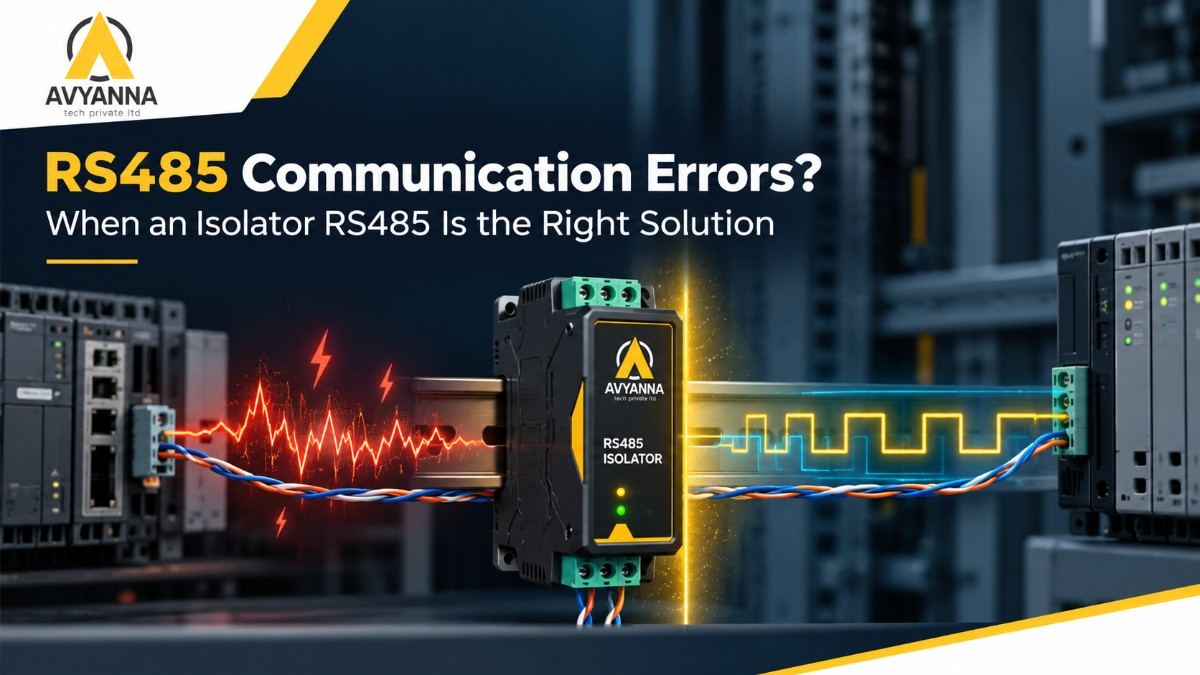
Garbled characters, random timeouts, devices that drop off the bus for no obvious reason: RS485 communication errors are frustrating precisely because they rarely point to a single obvious cause. Cabling gets checked, termination gets checked, baud rates get checked, and the errors keep coming back. In a surprising number of these cases, the real culprit is electrical rather than configurational, and an isolator rs485 is the fix that finally resolves it.
That said, an isolator isn’t a universal cure. Adding one to a network whose real problem is a swapped wire pair or a missing termination resistor wastes money and leaves the actual fault in place. The skill lies in diagnosing the error pattern first, then deciding whether isolation is genuinely what the network needs.
This guide walks through the common RS485 error symptoms, the checks to run before reaching for an isolator, and the specific conditions where an isolator rs485 is clearly the right solution.
Step 1: Rule Out the Common Non-Electrical Causes First
Before concluding that isolation is needed, eliminate the more routine causes of RS485 trouble. These are quicker and cheaper to check, and they account for a large share of communication problems:
- Swapped A/B (D+/D-) wires: polarity labeling varies between manufacturers, and a reversed pair is one of the most frequent causes of a device that never responds.
- Missing or doubled termination: an RS485 bus needs a termination resistor at each physical end, and only at the ends. Missing termination causes signal reflections; extra termination loads the line.
- Baud rate, parity, or stop bit mismatch: even one device with different serial settings can disrupt communication.
- Duplicate device addresses: two slaves answering the same address create collisions that look like noise.
- Poor cable choice or star topology: RS485 expects a daisy-chain bus with twisted-pair cable, not branching stubs of arbitrary length.
- Missing bias resistors: without biasing, the bus floats when idle and picks up false data.
If all of these check out and errors persist, the next place to look is the electrical environment around the network.
Error Symptoms That Point Toward an Isolator RS485
Certain error patterns strongly suggest ground-related or noise-related problems rather than configuration mistakes:
- Errors That Correlate with Equipment Operation: If communication errors spike when a nearby motor starts, a VFD ramps up, or welding equipment runs, electromagnetic interference and ground disturbances are likely coupling into the data line.
- Errors That Vary by Time of Day or Plant Load: Intermittent problems that come and go with production schedules often trace back to ground potential differences that change as electrical loads shift across the facility.
- Devices Powered from Different Sources Failing on the Same Bus: When devices on one RS485 segment draw power from separate supplies or different electrical panels, the difference in their ground references can inject noise or even stress the transceivers.
- Repeated Transceiver or Port Failures: If RS485 ports or interface chips keep burning out, voltage surges or large ground potential differences are a prime suspect. An isolator contains these events on one side of the barrier.
- Errors Only on Long Runs Between Buildings or Zones: Cable runs that cross separately grounded areas are classic ground loop territory, and the errors often worsen as the distance increases.
How an Isolator RS485 Solves These Problems
An isolator rs485 sits inline on the bus and electrically separates the two sides using optical or magnetic isolation, while still passing the data signal across. The practical effects are straightforward:
- Ground loops are broken, because the two sides no longer share a common ground reference.
- Surges and transients stay on one side, protecting expensive PLCs, PCs, and instruments from damage.
- Common-mode noise is rejected, so interference that rides on both signal lines no longer corrupts the data.
- Devices with independent power and grounding can coexist on the same communication network without interfering with each other.
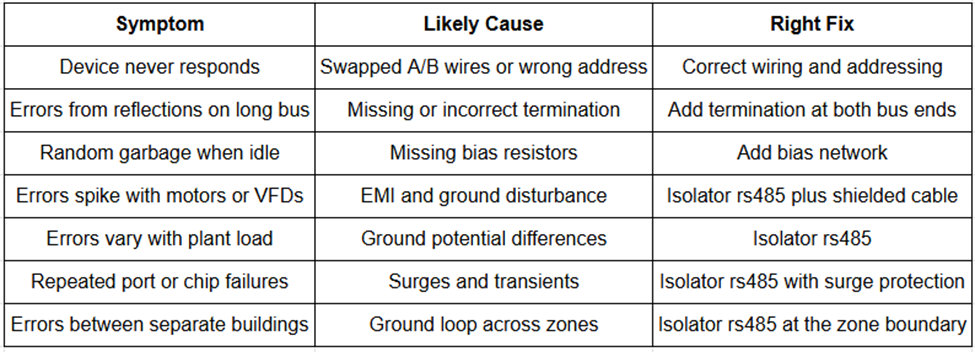
Diagnostic Table: Symptom, Likely Cause, and Right Fix
When an Isolator RS485 Is Not the Answer
An isolator rs485 won’t fix problems rooted elsewhere. It will not correct wrong baud settings, repair damaged cable, replace a missing termination resistor, or resolve duplicate addresses. It also doesn’t extend distance or increase device count on its own; for that, an RS485 isolator repeater combines isolation with signal regeneration. Treat the isolator as the solution to electrical problems specifically, and confirm the basics first.
How to Choose the Right Isolator RS485
- Isolation voltage rating: 1,500V is a common baseline, with 2,500V to 3,000V or higher offering a bigger margin in severe electrical environments.
- Data rate support: confirm the unit handles your network’s baud rate without added errors or latency.
- Automatic direction control: simplifies installation on half-duplex RS485 networks.
- Built-in surge protection: useful where outdoor runs or heavy switching loads create transient risk.
- Termination and bias options: reduce the need for external components.
- Industrial build: DIN-rail mounting, a wide operating temperature range, and a rugged enclosure for control cabinet use.
- Power requirements: confirm a suitable supply is available where the isolator will be installed.
Frequently Asked Questions
What causes RS485 communication errors?
Common causes include swapped A/B wires, missing or incorrect termination, mismatched baud rate or parity settings, duplicate device addresses, poor cabling, and electrical issues such as ground loops, electromagnetic interference, and voltage surges.
How do I know if I need an isolator rs485?
Suspect an isolator when errors correlate with motor or VFD operation, change with plant electrical load, appear between separately powered or separately grounded devices, or when RS485 ports fail repeatedly, and basic wiring, termination, and settings have already been verified.
Will an isolator rs485 fix all RS485 problems?
No. It addresses electrical problems such as ground loops, noise coupling, and surge damage. It will not fix wiring mistakes, wrong serial settings, missing termination, or duplicate addresses, so those should be ruled out first.
Does an isolator rs485 reduce communication speed?
A quality isolator supports standard RS485 baud rates without meaningful slowdown, but you should confirm the unit’s rated data speed against your network’s requirements, especially at higher baud rates.
What is the difference between an isolator rs485 and an RS485 repeater?
An isolator provides electrical separation to stop ground loops and surges, while a repeater regenerates the signal to extend distance or device count. An RS485 isolator repeater combines both functions in one unit.
Diagnose First, Then Isolate
RS485 communication errors have many possible causes, and the fastest route to a fix is working through the simple ones before blaming the environment. When wiring, termination, and settings all check out and the errors still track with motors, plant load, or separate grounding zones, an isolator rs485 is very often the right solution, breaking ground loops and containing surges at the source.
At Avyanna Tech, we help engineers diagnose RS485 problems and choose the right isolator rs485 for their network conditions. Contact us to explore our full range of isolation solutions and put an end to the intermittent errors that have been slowing your network down.


[email protected]