Best Rolling Display Solutions for Real-Time Production Updates
Rolling Display: Best Picks for Production Updates
A rolling display is one of the simplest, most effective tools for keeping a production floor informed in real time. Whether it’s showing line output, takt time, quality metrics, or safety alerts, a rolling display gives operators and supervisors instant visibility into what’s happening right now – without needing to check a terminal, walk to a control room, or wait for a shift report.
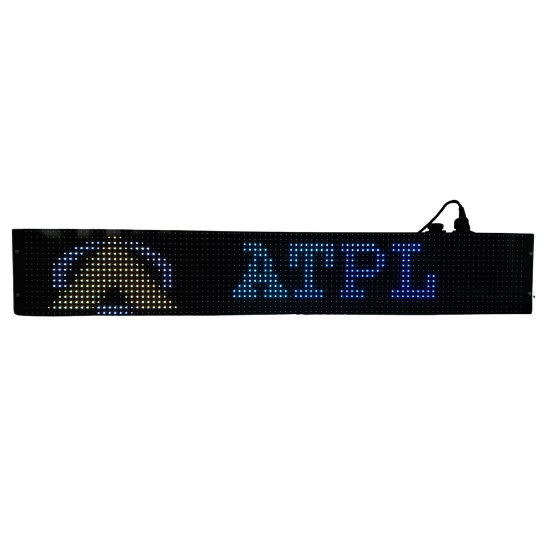
At its core, a rolling display is a scrolling LED or LCD messaging board that continuously updates text, numbers, or alerts as new data comes in. On modern production lines, these displays are increasingly connected directly to PLCs, MES (Manufacturing Execution Systems), and SCADA platforms, so the numbers on the board update automatically as machines run – no manual entry required.
This guide covers how rolling displays work, the different types available (including multi-color LED rolling display options), and how to choose the right one for real-time production visibility.
What Is a Rolling Display and How Does It Work?
A rolling display is an electronic scrolling message board, typically LED-based, that presents continuously updating text or numeric data by scrolling horizontally (or sometimes vertically) across the screen. In industrial settings, it’s most often used to show:
- Real-time production counts (units produced per hour/shift)
- Line efficiency, OEE (Overall Equipment Effectiveness), or take time
- Quality metrics such as defect rates or first-pass yield
- Safety messages, alarms, or downtime alerts
- Andon-style status updates (running, stopped, needs attention)
Most industrial rolling displays connect to the plant network or directly to a PLC/controller via Ethernet, RS-485, or Wi-Fi, pulling live data and refreshing the scrolling message automatically. This eliminates the delay and error risk of manually updating a whiteboard or paper tracker.
Why Real-Time Rolling Displays Matter on the Production Floor
Manufacturing teams have used static whiteboards and printed reports for decades, but these methods share the same weakness: the information is always a few minutes, hours, or a full shift behind reality. A rolling display closes that gap by showing what’s actually happening as it happens.
Key operational benefits include:
- Faster response to downtime – operators and supervisors see stoppages or slowdowns immediately, rather than discovering them at shift-end review.
- Improved accountability and pace – visible, live production counts naturally encourage teams to stay on target throughout the shift.
- Reduced manual reporting effort – automatic data feeds remove the need for someone to walk the floor updating boards by hand.
- Better cross-shift communication – incoming shifts can see exactly where the previous shift left off without a verbal handoff.
- Centralized visibility across large facilities – multiple rolling displays can be networked to show consistent, synchronized data across different areas of a plant.
Types of Rolling Displays for Industrial Use
Single-Color LED Rolling Display
The most basic and cost-effective option, typically using red or amber LEDs. Best suited for simple numeric counters, takt time boards, or single-line alert messages where color-coding isn’t required.
Multi-Color LED Rolling Display
A multi-color LED rolling display uses red, green, amber, or full RGB LEDs to visually differentiate types of information – for example, green for “on target,” amber for “behind schedule,” and red for “line down.” This color-coded approach makes status recognizable at a glance from across a noisy or busy production floor, which is especially valuable for Andon systems and safety alerts where quick visual recognition matters more than reading exact numbers.
Networked/Multi-Zone Rolling Displays
For larger facilities, rolling displays can be linked together across multiple zones or production lines, all pulling from the same central data source. This ensures consistent messaging plant-wide and allows a single dashboard or MES system to push updates to every display simultaneously.
Wireless and PoE-Enabled Displays
Modern rolling displays increasingly support Wi-Fi or Power over Ethernet (PoE), simplifying installation in facilities where running new conduit or power lines to a display location isn’t practical.
How to Choose the Right Rolling Display for Your Facility
- Visibility distance: Character height should scale with viewing distance – larger character heights for displays viewed from 50+ feet away.
- Color requirements: A multi-color LED rolling display is worth the investment if you need status-based color coding (red/amber/green) rather than plain scrolling text.
- Data source integration: Confirm compatibility with your PLC, MES, or SCADA system – via Ethernet, RS-485, Modbus, or API integration.
- Environmental rating: Look for dust and moisture resistance (IP-rated enclosures) if the display will be mounted on the production floor rather than in an office area.
- Mounting and size: Match display length and mounting style (ceiling-hung, wall-mounted, or pole-mounted) to your facility layout.
- Update speed and scrolling control: Ensure the display can refresh quickly enough to reflect true real-time data, with adjustable scroll speed for readability.
Rolling Display vs. Traditional Whiteboard Tracking
| Factor | Rolling Display | Whiteboard/Manual Tracking |
| Update frequency | Real-time, automatic | Manual, periodic (hourly/shift-based) |
| Data accuracy | Pulled directly from PLC/MES | Subject to human transcription error |
| Visibility distance | Readable from long distances (LED) | Limited to close range |
| Color-coded status | Yes, with multi-color LED rolling display | No |
| Multi-line/zone sync | Yes, networked displays | No, independent per location |
| Labor required | Minimal (automated) | Ongoing manual updates |
Frequently Asked Questions
What is a rolling display used for in manufacturing? A rolling display is used to show real-time production data – such as unit counts, line efficiency, downtime alerts, and quality metrics – on a scrolling LED or LCD screen visible across the production floor.
What is the difference between a single-color and multi-color LED rolling display? A single-color rolling display shows scrolling text or numbers in one LED color, typically for simple counters or messages. A multi-color LED rolling display uses multiple colors (often red, amber, and green) to indicate different statuses at a glance, such as on-target, behind-schedule, or line-down conditions.
Can a rolling display connect directly to a PLC? Yes. Most industrial rolling displays support direct connections to PLCs and controllers via Ethernet, RS-485/Modbus, or similar industrial protocols, allowing production data to update automatically without manual entry.
How far away can a rolling display be read from? Readability distance depends on character height. As a general rule, LED character height should be roughly 1 inch for every 30-40 feet of intended viewing distance.
Are rolling displays suitable for Andon systems? Yes. Multi-color LED rolling displays are commonly used in Andon systems because color-coded scrolling messages allow operators and supervisors to instantly recognize line status without reading detailed text.
Keep Your Production Floor Informed in Real Time
A rolling display turns scattered production data into a single, glanceable source of truth for your entire floor. Whether you need a straightforward scrolling counter or a color-coded multi-color LED rolling display integrated with your MES and PLC systems, the right solution keeps operators, supervisors, and shift teams aligned on what’s happening right now – not what happened an hour ago.
At Avyanna Tech, we help manufacturers select and deploy rolling display solutions built for real-time production visibility, from single-line counters to networked multi-zone Andon systems. Explore our full range of rolling display options and give your production floor the real-time visibility it needs.
[email protected]