
How Rugged Panel PCs Handle Dust, Vibration and Temperature Extremes
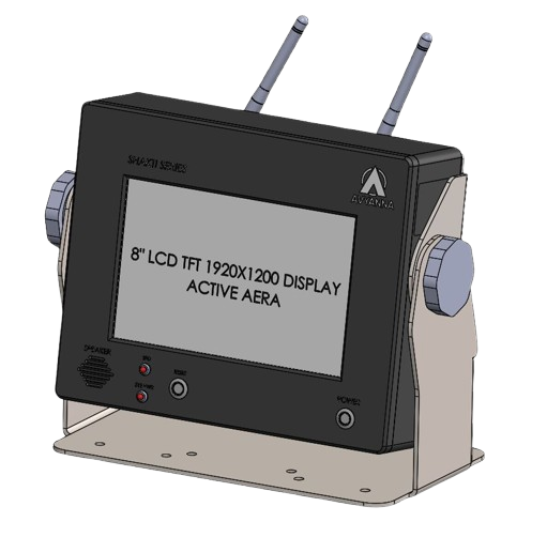
Rugged Panel PC: How It Handles Dust, Vibration, Heat
A standard office PC wouldn’t survive a week on a foundry floor, near a wash-down station, or bolted to vibrating machinery on a production line. Dust gets into the fans, vibration loosens connectors, and heat spikes trigger shutdowns at exactly the wrong moment. This is precisely the problem a rugged panel pc is built to solve. Unlike consumer-grade computers repurposed for industrial use, rugged panel PCs are engineered from the ground up to keep running in conditions that would disable ordinary hardware within days. Here’s exactly how they do it, and what specifications actually matter when you’re choosing one for your facility.
What Is a Rugged Panel PC?
A rugged panel PC is an industrial computer that combines a display, touchscreen, and processing hardware into a single sealed unit, built to withstand dust, moisture, vibration, and temperature extremes that would damage standard computing equipment.
Unlike a typical all-in-one PC, it’s constructed with a reinforced metal chassis, sealed connectors, and internal components chosen specifically for thermal stability and shock resistance. It’s designed to be mounted directly on machinery, control panels, or production lines – not sitting on a desk in a climate-controlled office.
How Rugged Panel PCs Handle Dust and Particulate Contamination
IP-Rated Sealing
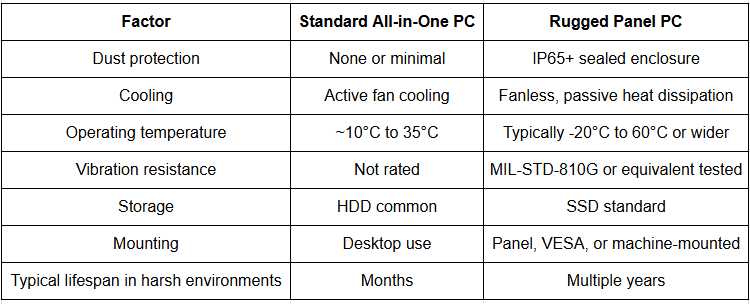
Most industrial-grade rugged panel PCs carry an IP65 or higher ingress protection rating, meaning the front bezel is fully sealed against dust and low-pressure water jets. This rating matters most in environments like cement plants, woodworking shops, and foundries, where airborne particulate is constant.
Why does this matter? A single dust particle lodged in a standard PC’s cooling fan can cause overheating within weeks. A sealed rugged panel PC removes that failure point entirely by keeping contaminants out of the internal cavity altogether.
Fanless Design
Many rugged panel PCs skip fans entirely, relying instead on passive heat sinks and a sealed aluminum chassis to dissipate heat. This eliminates the most common dust entry point on a standard computer and removes a moving part that would otherwise wear out over time.
How Rugged Panel PCs Handle Vibration and Mechanical Shock
Machinery-mounted computers face constant low-level vibration and occasional mechanical shock – from conveyor lines, presses, mobile equipment, or vehicle-mounted applications.
Rugged panel PCs address this through:
- Solid-state storage (SSD) instead of traditional hard drives with moving read/write heads, which are prone to failure under vibration
- Shock-mounted internal components, isolating sensitive boards from chassis-transmitted vibration
- Reinforced connectors with locking mechanisms, preventing cables from working loose over time
- MIL-STD-810G or equivalent shock and vibration testing, a benchmark many industrial-grade units are validated against before deployment
Example: On a packaging line where a standard all-in-one PC was mounted directly to a vibrating conveyor frame, connector fatigue caused intermittent display failures within months. Switching to a rugged panel PC with locking connectors and SSD storage eliminated the issue entirely.
How Rugged Panel PCs Handle Temperature Extremes
Wide Operating Temperature Range
Industrial rugged panel PCs are typically rated to operate across a wide temperature band – often -20°C to 60°C or beyond – compared to the narrower 10°C to 35°C range most commercial PCs are designed for.
This matters in environments like outdoor kiosks, unheated warehouses, near furnaces, or in cold storage and food processing facilities, where ambient temperature swings would shut down or damage standard hardware.
Thermal Design Without Active Cooling
Because many rugged panel PCs are fanless, they rely on efficient heat dissipation through the chassis itself rather than airflow. This passive approach avoids the thermal cycling stress that fan-cooled systems experience as temperatures fluctuate.
Component-Level Heat Tolerance
Beyond the chassis design, the internal components themselves – processors, storage, and memory – are often industrial-grade parts rated for extended temperature tolerance, not consumer-grade parts placed in a tougher enclosure.
Standard PC vs. Rugged Panel PC: Key Differences
Common Industrial Applications
- Manufacturing and production lines – machine HMI and process monitoring
- Foundries and metalworking – high-heat, high-dust environments
- Food and beverage processing – wash-down areas requiring sealed enclosures
- Oil, gas, and chemical plants – explosive-atmosphere-adjacent monitoring stations
- Warehousing and logistics – unheated or outdoor-adjacent installations
- Transportation and mobile equipment – vibration-heavy vehicle-mounted systems
What to Check Before Buying a Rugged Panel PC
- Confirm the IP rating matches your environment. IP54 suits light dust exposure; IP65 or higher is needed for wash-down or heavy particulate areas.
- Check the full operating temperature range, not just the “typical” range – ask specifically about cold-start and sustained high-heat performance.
- Verify vibration and shock certification, especially for machine-mounted or vehicle-mounted applications.
- Choose the right touchscreen type. Resistive touchscreens work with gloves and in wet conditions; capacitive screens offer better clarity but may need bare-finger or specialized glove compatibility.
- Check display brightness for outdoor or high-glare areas. Sunlight-readable displays (typically 1000+ nits) prevent visibility issues near windows or outdoor installations.
- Ask about long-term component availability. Industrial deployments often run five to ten years, so consistent spare parts and support matter more than upfront cost alone.
Common Mistakes to Avoid
- Choosing based on IP rating alone, while ignoring vibration resistance or temperature range for the specific application
- Assuming a “rugged-looking” enclosure means true industrial-grade internals – always check certification, not just chassis appearance
- Overlooking touchscreen type, leading to poor usability for operators wearing gloves
- Underestimating temperature swings, especially near equipment that generates localized heat, like furnaces or motors
- Ignoring long-term serviceability, resulting in difficulty sourcing replacement units years down the line
Frequently Asked Questions
1. What makes a panel PC “rugged”?
A rugged panel PC is built with a sealed, reinforced chassis, fanless or passively cooled internals, industrial-grade components, and certification for dust, vibration, and wide temperature tolerance – unlike standard PCs designed for office environments.
2. What IP rating should an industrial panel PC have?
For most industrial floors, IP65 is the practical standard, protecting against dust ingress and low-pressure water jets. Wash-down environments in food processing may require an even higher rating.
3. Can a rugged panel PC operate without a fan?
Yes. Most rugged panel PCs use fanless, passive cooling through the chassis itself, which improves reliability by eliminating a common failure point and keeping dust out of internal components.
4. What temperature range can a rugged panel PC handle?
Industrial rugged panel PCs typically operate reliably between -20°C and 60°C, though exact ranges vary by model. Always confirm the manufacturer’s tested range for both cold-start and sustained operation.
5. Do rugged panel PCs need special maintenance?
They generally require less maintenance than standard PCs due to sealed enclosures and solid-state storage, but periodic checks of mounting hardware, connectors, and display cleanliness are still recommended.
6. Are rugged panel PCs more expensive than standard computers?
Yes, upfront cost is typically higher, but the total cost of ownership is often lower due to reduced downtime, fewer failures, and a significantly longer service life in harsh environments.
7. What industries use rugged panel PCs most commonly?
Manufacturing, foundries, oil and gas, food and beverage processing, warehousing, and transportation are among the most common industries relying on rugged panel PCs for machine interfaces and process monitoring.
8. How long does a rugged panel PC typically last?
With proper specification matched to the environment, a rugged panel PC can reliably operate for several years, compared to a standard PC that may fail within months under similar dust, vibration, or temperature stress.
Conclusion
Dust, vibration, and temperature extremes aren’t occasional challenges on an industrial floor – they’re daily conditions that standard computing hardware simply wasn’t built to survive. A rugged panel pc addresses each of these stresses directly, through sealed IP-rated enclosures, fanless thermal design, shock-tested internals, and wide operating temperature tolerance.
Choosing the right unit comes down to matching these specifications to your actual environment, rather than assuming any “industrial-looking” computer will hold up long-term. Getting that specification right the first time avoids the downtime and replacement costs that come with hardware that wasn’t built for the job.
If you’re evaluating a rugged panel PC for your facility, Talk to our team about matching the right IP rating, temperature tolerance, and mounting configuration to your specific application.


[email protected]