
Bring Legacy Serial Devices Online Without Replacing Existing Equipment
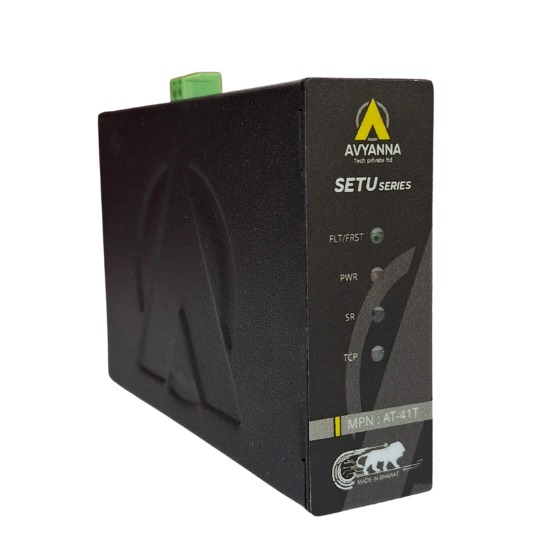
Serial Device Server: Connect Legacy Equipment
Factories, utilities, and process plants are full of equipment that still works perfectly well – CNC machines, PLCs, barcode scanners, weighing systems, and lab instruments – but speaks a language modern networks weren’t built for: RS-232, RS-422, or RS-485 serial communication. Replacing this equipment just to get it onto an Ethernet network or into the cloud is expensive, disruptive, and often unnecessary. That’s where a serial device server comes in. A serial device server is a small networking device that converts serial data (RS-232/422/485) into TCP/IP Ethernet traffic, allowing legacy serial devices to communicate over a standard network, be accessed remotely, and integrate with modern SCADA, IIoT, and cloud platforms – without touching the original equipment.
This guide explains what a serial device server does, how it works, and how it lets you modernize data connectivity while keeping trusted legacy equipment exactly as it is.
What Is a Serial Device Server and How Does It Work?
A serial device server sits between a serial-only device and your Ethernet network. On one side, it connects via a serial cable (DB9, terminal block, or similar) to the legacy equipment. On the other side, it connects via an Ethernet port – or increasingly, Wi-Fi or cellular – to your network infrastructure.
Functionally, it performs protocol conversion: serial data packets are wrapped into TCP or UDP packets and transmitted across the network, then unwrapped back into serial format at the receiving end. This process is often called “serial tunneling” or “transparent serial-to-Ethernet conversion,” because from the software’s perspective, the serial device behaves as if it were connected locally – even though it may be communicating across a plant, a building, or the internet.
Common device server operating modes include:
- Virtual COM port mode – the serial device appears as a local COM port on a remote PC, so existing software requires no modification
- TCP server/client mode – for direct socket-based communication with SCADA or custom applications
- Modbus TCP/RTU gateway mode – converts Modbus RTU serial traffic to Modbus TCP for integration with modern PLCs and HMIs
Why Legacy Serial Equipment Still Matters in Modern Automation
It’s tempting to assume older serial-based equipment is obsolete, but in reality, much of the world’s industrial base still runs on RS-232/422/485 communication:
- PLCs and controllers installed 10-20 years ago that remain fully functional
- Lab and measurement instruments validated for regulatory compliance, where recertification after replacement is costly
- Point-of-sale and barcode systems that work reliably and don’t need replacing
- Building automation and HVAC controllers using older serial protocols
- CNC and factory floor machinery with long depreciation cycles and high replacement costs
Ripping out functioning equipment simply because it lacks native Ethernet connectivity is rarely justified financially or operationally. A serial device server extends the useful life of this equipment while unlocking modern connectivity benefits.
Key Benefits of Using a Serial Device Server
1. Connect Legacy Devices Without Rip-and-Replace
The most immediate benefit is cost avoidance. Instead of budgeting for new equipment, recalibration, retraining, and downtime, a serial device server lets you add network connectivity for a fraction of the cost – often in a single afternoon of installation.
2. Centralized Remote Monitoring and Access
Once serial devices are bridged onto the network, operators and engineers can monitor, configure, and troubleshoot equipment remotely – from a control room, another facility, or off-site – rather than requiring someone to physically connect a laptop to the machine.
3. Integration with SCADA, IIoT, and Cloud Platforms
A serial device server enables data from legacy equipment to flow into modern SCADA systems, historian databases, or cloud-based IIoT platforms. This supports predictive maintenance, production analytics, and centralized dashboards that pull data from both new and old equipment side by side.
4. Multi-Device and Multi-Port Scalability
Serial device servers are available in single-port models for individual machines and multi-port models (4, 8, 16+ ports) for connecting entire banks of equipment – such as a row of lab instruments or a rack of legacy controllers – through one centralized unit.
5. Improved Network Security and Isolation
Rather than exposing legacy devices directly, a properly configured serial device server can sit behind managed switches, VLANs, and firewalls, giving IT and OT teams better control over which systems can access sensitive equipment.
Serial Device Server vs. Direct Serial Cabling: A Quick Comparison
| Factor | Serial Device Server | Direct Serial Cable Connection |
| Maximum distance | Extends across entire network (LAN/WAN) | Limited to ~15 meters (RS-232) or ~1200m (RS-485) |
| Remote access | Yes, from anywhere on the network or internet | No, requires physical proximity |
| Multiple simultaneous users | Yes, via virtual COM port sharing | No, single point-to-point connection |
| Integration with SCADA/cloud | Native support via TCP/IP | Requires additional gateway hardware |
| Existing software compatibility | Full compatibility via virtual COM port mode | N/A |
| Scalability | Easily scales to multiple devices/ports | Requires separate cabling per device |
How to Choose the Right Serial Device Server
- Port count and type: Match RS-232, RS-422, or RS-485 support (and quantity) to your equipment’s actual interface.
- Operating mode support: Confirm virtual COM port, TCP/UDP socket, and Modbus gateway modes are available if your software requires them.
- Network connectivity options: Ethernet is standard; consider Wi-Fi or cellular models for equipment in hard-to-wire locations.
- Industrial durability: Look for DIN-rail mounting, wide operating temperature ranges, and rugged enclosures for factory-floor deployment.
- Protocol support: Verify compatibility with Modbus RTU/TCP or other industrial protocols used in your facility.
- Security features: Prioritize models with encryption, VPN support, and access control for devices exposed to broader networks.
- Vendor reliability: Choose a supplier offering long-term firmware support and technical assistance for industrial deployments.
Frequently Asked Questions
What does a serial device server do?
A serial device server converts serial communication (RS-232, RS-422, or RS-485) from legacy equipment into Ethernet/TCP-IP traffic, allowing that equipment to be accessed, monitored, and controlled over a standard network without hardware modification.
Do I need to replace my legacy equipment to connect it to a network?
No. A serial device server allows existing serial equipment to connect to Ethernet networks and cloud platforms without any changes to the original device, preserving its warranty, certification, and configuration.
Can a serial device server work with Modbus equipment?
Yes. Many serial device servers include a Modbus gateway mode that converts Modbus RTU (serial) traffic into Modbus TCP, allowing legacy Modbus devices to communicate with modern PLCs, HMIs, and SCADA systems.
What is the difference between a serial device server and a serial-to-Ethernet converter?
The terms are often used interchangeably. Both describe hardware that bridges serial communication to Ethernet networks, though “serial device server” more commonly refers to units supporting virtual COM port and multi-protocol modes for broader software compatibility.
How many devices can one serial device server support?
This depends on the model. Single-port units support one device, while multi-port serial device servers can support 4, 8, 16, or more serial devices from a single networked unit.
Modernize Connectivity Without Losing What Works
Legacy serial equipment doesn’t need to be a barrier to modernization. With the right serial device server, you can bring RS-232/422/485 devices onto your Ethernet network, enable remote access, and integrate with SCADA and IIoT platforms – all while keeping your existing, reliable equipment exactly as it is.
At Avyanna Tech, we help engineers and system integrators select the right serial device server for their environment, from single-port units for individual machines to rugged, multi-port gateways for entire production lines. Contact us to explore our full range of connectivity solutions and bring your legacy equipment online without the cost or disruption of replacement.
[email protected]