5 Signs Your Automation System Needs an RS232 to RS485 Converter
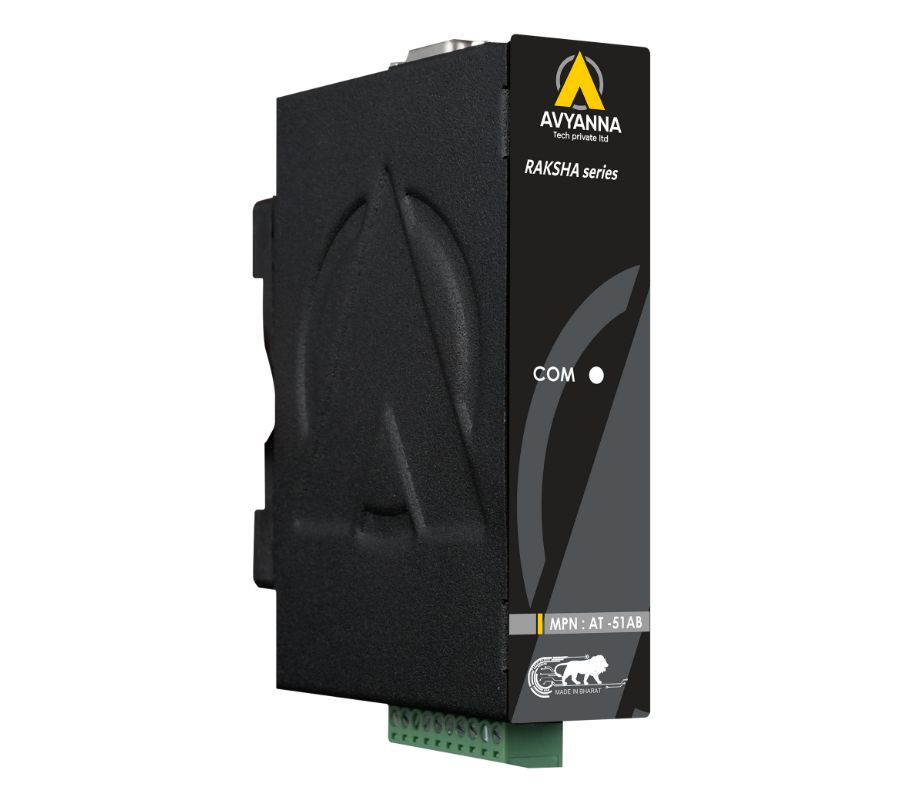
5 Signs You Need an RS232 to RS485 Converter
An RS232 to RS485 converter isn’t always an obvious addition to an automation system – most facilities only realize they need one after running into a specific limitation: a cable run that’s too long, a device that needs to talk to more than one other unit, or communication errors that never quite go away. Recognizing these signs early can save significant troubleshooting time and prevent the kind of intermittent failures that are difficult to trace back to their root cause.
RS232 was designed decades ago for short, single-device connections, and it still works well within those limits. But most industrial automation systems today involve longer distances, multiple connected devices, and electrically noisier environments than RS232 was built to handle – which is exactly where an RS232 to RS485 converter becomes necessary rather than optional.
Here are five clear signs your system has outgrown RS232 and needs to be bridged to RS485.
Sign 1: Your Cable Run Exceeds RS232’s Distance Limit
RS232 is reliably limited to about 15 meters (50 feet) before signal degradation starts causing communication errors. If your PLC, instrument, or controller needs to reach a device farther away than that – across a large facility, between buildings, or down a long production line – RS232 alone won’t reliably support the connection.
An RS232 to RS485 converter solves this directly: RS485’s differential signaling supports cable runs of up to 1,200 meters (4,000 feet) or more, making it the standard choice whenever distance becomes a limiting factor. If you’ve noticed communication becoming unreliable as cable length increases, distance is very likely the underlying cause.
Sign 2: You Need to Connect More Than One Device to the Same Line
RS232 is inherently a point-to-point protocol – one device talks to exactly one other device. If your automation system needs a single controller, PC, or PLC to communicate with multiple sensors, meters, or instruments on a shared line, RS232 simply isn’t built for that topology.
RS485 supports multi-drop networking, allowing up to 32 devices (or more, with repeaters) to share a single communication bus. An RS232 to RS485 converter bridges an RS232-only controller onto this multi-drop network, letting one connection manage many devices instead of requiring a separate connection for each.
Sign 3: You’re Experiencing Intermittent or Unexplained Communication Errors
Garbled data, random timeouts, or connections that drop out without a clear pattern are common symptoms when RS232 is pushed beyond its practical limits – whether from cable length, electrical noise, or ground potential differences between connected devices. RS232’s single-ended signaling, referenced to a common ground, is inherently more susceptible to electrical noise than RS485’s differential signaling.
If cabling, connectors, and basic troubleshooting haven’t resolved persistent communication errors, converting to RS485 – ideally through an isolated RS232 to RS485 converter – often eliminates the noise susceptibility causing the problem in the first place.
Sign 4: Your Facility Has Electrically Noisy Equipment Nearby
Motors, variable frequency drives (VFDs), welding equipment, and large switching loads generate electromagnetic interference (EMI) that can couple into nearby data cabling. RS232’s single-ended signaling has minimal built-in noise immunity, making it particularly vulnerable in electrically busy industrial environments.
RS485’s differential signaling is inherently more resistant to this kind of interference, since noise tends to affect both signal wires equally and gets cancelled out at the receiving end. If your RS232-connected equipment sits anywhere near heavy electrical loads, converting to RS485 significantly improves communication reliability.
Sign 5: You’re Integrating Legacy Equipment into a Modern Multi-Device Network
Many facilities have older PLCs, instruments, or controllers that only support RS232, while the rest of the automation system – newer sensors, meters, or a centralized SCADA platform – communicates over RS485 or Ethernet-based networks. Rather than replacing functional legacy equipment, an RS232 to RS485 converter allows it to join the broader network exactly as-is, preserving the investment in existing hardware while extending its usefulness into a modern, networked system.
This is especially relevant during automation upgrades or Industry 4.0 initiatives, where the goal is connecting existing equipment rather than replacing it outright.
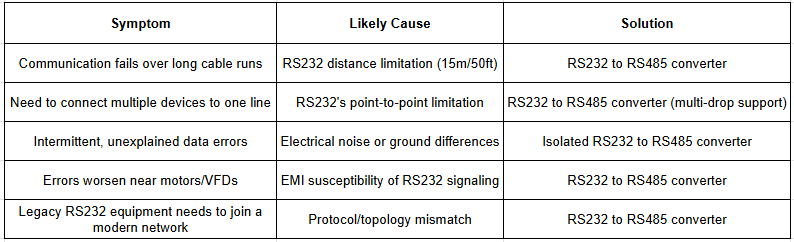
Quick Diagnostic: Do You Need an RS232 to RS485 Converter?
What to Look for in an RS232 to RS485 Converter
- Isolation: An isolated converter prevents ground loops and protects equipment from electrical transients – important in any environment with mixed power sources or nearby heavy machinery.
- Automatic direction control: RTS/DTR-based automatic switching simplifies wiring and avoids the need for software-level flow control changes.
- Built-in termination and biasing: Prevents signal reflection and keeps the RS485 bus stable when idle.
- Baud rate compatibility: Confirm the converter supports the baud rates used by both legacy and modern connected equipment.
- Industrial-grade housing: DIN-rail mounting and a wide operating temperature range for control cabinet or factory floor installation.
Frequently Asked Questions
How do I know if I need an RS232 to RS485 converter? You likely need an RS232 to RS485 converter if your cable run exceeds RS232’s 15-meter limit, you need to connect multiple devices to one communication line, you’re experiencing intermittent communication errors, your equipment is near electrically noisy machinery, or you’re integrating legacy RS232 equipment into a broader RS485 or networked system.
Can RS232 be extended without a converter? RS232 signal boosters exist but offer limited distance improvement and don’t address RS232’s inherent point-to-point limitation or its susceptibility to electrical noise. An RS232 to RS485 converter is generally the more reliable and scalable solution for distance and multi-device connectivity issues.
What is the maximum distance for RS232 versus RS485? RS232 is reliably limited to about 15 meters (50 feet), while RS485 can support cable runs of up to 1,200 meters (4,000 feet) or more, making an RS232 to RS485 converter necessary for any application exceeding RS232’s short-distance limitation.
Does an RS232 to RS485 converter fix communication errors caused by electrical noise? Yes, particularly when the converter includes galvanic isolation. RS485’s differential signaling is inherently more noise-resistant than RS232, and isolation further protects against ground loops and electrical transients that commonly cause intermittent communication errors.
Can I connect old RS232 equipment to a new RS485-based automation system? Yes. An RS232 to RS485 converter allows legacy RS232-only equipment to communicate on modern RS485 networks, letting older instruments, PLCs, or controllers join updated automation systems without requiring hardware replacement.
Don’t Wait for Communication Failures to Add a Converter
Recognizing these five signs early – distance limitations, multi-device needs, unexplained errors, electrical noise, and legacy equipment integration – can help you address RS232’s limitations before they turn into costly downtime or hard-to-diagnose communication failures. In most cases, an RS232 to RS485 converter is a straightforward, low-cost fix for problems that would otherwise require re-cabling or equipment replacement.
At Avyanna Tech, we help engineers and system integrators select the right RS232 to RS485 converter for their specific distance, noise, and multi-device requirements. Contact us to explore our full range of data converters and solve these communication limitations before they become a bigger problem.
[email protected]